

Free WordPress Plugin
Open Source
By Hopeleaf Technologies
Hreflang Customizer — Add Hreflang Tags to Any WordPress Site
Stop losing international search traffic to the wrong language version of your pages. Hreflang Customizer outputs the correct hreflang tags in your WordPress site's head — without needing WPML, Polylang, or any translation plugin.
Latest
Free
Languages
WordPress.org
Tested
Open Source
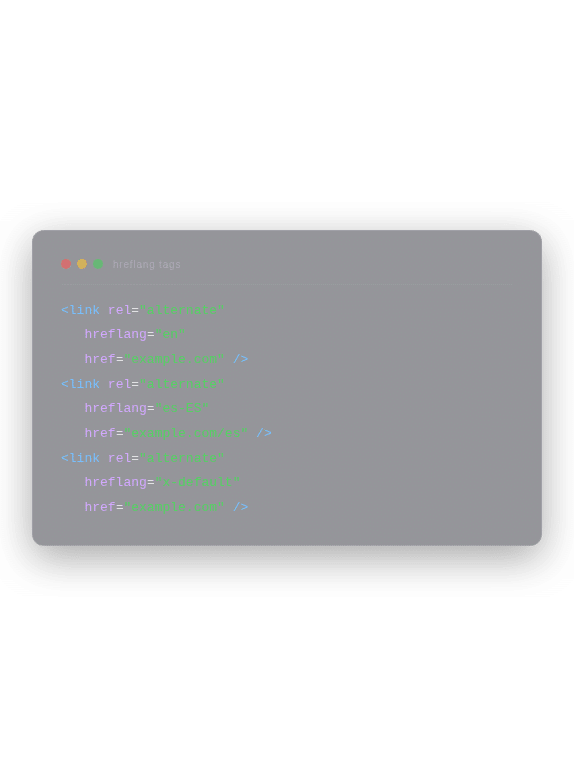
The Simplest Way to Add Hreflang Tags to WordPress
Hreflang tags are HTML link elements that tell search engines — Google, Bing, Yandex — which language and regional version of a page to show to users in different countries. Without them, search engines guess.


And when they guess wrong, users in Australia see your UK pricing page, or visitors in France land on your English homepage. You lose the click. You lose the conversion.
Most solutions require a full multilingual plugin stack — WPML, Polylang, or TranslatePress. These are powerful tools, but they're complex, expensive, and often far more than a site needs. Hreflang Customizer takes a different approach: it adds hreflang tags to any WordPress site in under 5 minutes, with no translation infrastructure required.
Built and maintained by Jaimish Saliya — CEO of Hopeleaf Technologies and a WordPress specialist with over nine years of experience building multilingual and multi-regional sites — Hreflang Customizer is the tool we built because no existing free plugin solved this specific problem cleanly.
Everything You Need. Nothing You Don't.
Hreflang Customizer does one thing and does it correctly — outputs accurate hreflang tags in your WordPress site's head. No upsells. No premium tier. No bloat.
Works Without a Translation Plugin
Standalone mode outputs hreflang tags on every page using your site's existing URLs. No WPML, Polylang, or TranslatePress needed. Install, configure, done.
Weglot Integration
If you use Weglot for translation, the plugin automatically maps Weglot's translated URLs to your selected hreflang codes — zero manual configuration required.
Searchable Language Picker — 180+ Options
A clean, searchable grid of 180+ language and regional variant codes. Type 'en-AU', 'fr-BE', or 'zh-TW' — the right code appears instantly.
Tag Chip Interface
Selected languages appear as removable badge chips showing the hreflang code. You see exactly what will be output in the head of your site before saving.

x-default Support
Select x-default to designate your homepage as the fallback URL when no language matches the user's browser settings — correct implementation for international sites.
Cached Language List — Fast & Lightweight
The language list is cached via the WordPress Transients API — fetched at most once every 12 hours. No repeated API calls. Zero frontend performance impact.
WordPress.org Security Compliant
All inputs are sanitised, escaped, and validated. The plugin passes WordPress.org's Plugin Check (PCP) tool. No security shortcuts, no unescaped output.
Clean, Modern Admin UI
A fully responsive settings page that feels native to WordPress — no iframe popups, no legacy jQuery UI. Works on any screen size, loads fast, and behaves consistently.
100% Free — No Premium Tier
Hreflang Customizer is completely free, open source, and published on WordPress.org. There is no paid version, no feature gating, and no upsells.
Static Fallback — Always Works
If the optional remote language API is unreachable, the plugin falls back to its built-in list of 180+ languages automatically. Your hreflang tags keep working regardless.
Simple Configuration. Correct Output. Every Time.
Hreflang Customizer works in two modes depending on whether you use a translation plugin. In both modes, the output is the same: a set of clean, correctly formatted hreflang link tags in your WordPress site's head.
- Mode 1
Standalone — No Translation Plugin Required
In standalone mode, you select your target language and regional codes in the plugin's settings page. The plugin outputs one hreflang tag per selected code on every page of your site, pointing to that page's canonical URL.
This is the correct implementation for sites that already serve localised content across pages — for example, an Australian agency that wants to signal to Google that their site targets English-speaking users in Australia, the UK, and the USA.
<link rel="alternate" href="https://yoursite.com/about/" hreflang="en-AU" /> <link rel="alternate" href="https://yoursite.com/about/" hreflang="en-GB" /> <link rel="alternate" href="https://yoursite.com/about/" hreflang="en-US" /> <link rel="alternate" href="https://yoursite.com/" hreflang="x-default" />
- Mode 2
Weglot Integration — Automatic URL Mapping
If Weglot is installed and active, Hreflang Customizer detects it automatically and switches to Weglot mode. It maps Weglot's translated page URLs to your selected hreflang codes — so the French version of your About page gets hreflang='fr' pointing to the correct translated URL.
No manual URL mapping required. The plugin reads Weglot's URL structure and handles the mapping automatically.
What is x-default?
x-default is a special hreflang value that designates a 'catch-all' URL — the page Google shows when no other language/region code matches the user's browser settings. This is the recommended implementation for international sites according to Google's official hreflang documentation.
Install, Configure, Done
Hreflang Customizer installs like any standard WordPress plugin and takes under 5 minutes to configure. No developer required.
01
Install the Plugin
In your WordPress admin dashboard, go to Plugins > Add New. Search for 'Hreflang Customizer'. Click Install Now, then Activate. Or download the zip from WordPress.org and upload via Plugins > Add New > Upload Plugin.
02
Open Settings
After activation, a new menu item appears in your WordPress admin sidebar: Hreflang > Settings. Click it to open the plugin configuration page.
03
Select Your Languages
Use the searchable language picker to find and select your target language and regional codes — for example, en-AU, en-GB, fr-FR, de-DE, or any of the 180+ supported codes. Selected languages appear as removable tag chips in the sidebar.
04
Select x-default (optional)
If your site has an international audience and you want to designate a fallback URL, tick the x-default option. This outputs a tag pointing to your site's homepage for users whose browser language doesn't match any other hreflang tag.
05
Save Languages
Click Save Languages. The hreflang tags will appear in your site's immediately — on every page, automatically. Verify by viewing your page source (Ctrl+U) and searching for 'hreflang'.
Compatible with Any WordPress Setup
Requirement
Details
Plugin Version
1.1.0 (current)
WordPress Version
5.8 or higher
PHP Version
7.0 or higher
Tested Up To
WordPress 6.9.4
Translation Plugin
None required — works standalone
Optional Integration
Weglot (auto-detected if active)
Planned Integrations
WPML, TranslatePress, Polylang (future release)
Licence
GPL v2 or later — open source
WordPress.org
Listed in the official plugin directory
Built to Solve a Real Problem We Hit on Client Projects
At Hopeleaf Technologies, we build WordPress websites for clients in India, Australia, Belgium, the USA, and the UK. Multi-regional targeting — making sure Google shows the right version of a site to the right audience — is a routine part of our SEO setup on international projects.
The existing free options were either too limited (no regional variant support, no x-default, no Weglot compatibility), too complex (requiring a full multilingual plugin stack for a feature that should take 5 minutes), or abandoned (last updated years ago, failing WordPress security checks). So we built Hreflang Customizer — the plugin we wanted to exist.
Version 1.1.0 is a complete rebuild — a clean, standalone mode, Weglot integration, a redesigned admin UI, a static language fallback, and full WordPress.org security compliance. It's the tool we use on our own client projects, and it's 100% free because good SEO tools shouldn't be paywalled.
Jaimish Saliya
WordPress specialist with over nine years of experience building multilingual and multi-regional sites for clients worldwide. Hreflang Customizer is maintained as an open-source contribution to the WordPress community.
- 🇮🇳 India
- 🇦🇺 Australia
- 🇧🇪 Belgium
- 🇺🇸 USA
- 🇬🇧 UK
Rated 5 Stars on WordPress.org
5/5
Great Lightweight Hreflang Solution
"Hreflang Customizer by Jaimish Saliya is a simple and effective plugin for adding hreflang tags without needing a multilingual setup. It's easy to configure, works smoothly, and helps improve international SEO. The integration with Weglot is a great added benefit. Clean UI, good performance, and completely free — highly recommended!"
- divya2899
- Verified WordPress.org Review
- April 29, 2026
5/5
Super plugin to setup & manage hreflang at a multi country level
"It makes handling international SEO much easier, especially for sites with different regional versions. The setup is straightforward, and it helps keep hreflang implementation organized and reliable. Highly recommended for multi-country websites."
- kevincoppens
- Verified WordPress.org Review
- May 5, 2026
Do I need WPML, Polylang, or any translation plugin to use this?
No. Hreflang Customizer works in standalone mode — it outputs hreflang tags on every page using your existing URLs. You don't need any translation plugin installed. If you do use Weglot, the plugin integrates automatically and maps translated URLs correctly.
What is x-default and should I use it?
x-default is a special hreflang value that tells Google which page to show when no other language or region code matches the visitor's browser language. When you select x-default, Hreflang Customizer outputs a tag pointing to your site's home URL. You should use it if your site targets an international audience and you want Google to have a defined fallback page.
Does the plugin make external requests? Is my data safe?
The plugin optionally fetches an extended language list from https://app.seo-hreflang.com/api/languages and caches the result for 12 hours using the WordPress Transients API. The request contains no personal data, no user data, and no site content — it is purely a language list lookup. If the external service is unavailable, the built-in list of 180+ languages is used automatically. No data is ever sent to a third party.
Which translation plugins are supported?
Currently, Weglot is fully supported in addition to standalone mode. The plugin auto-detects Weglot and maps translated URLs automatically. Support for WPML, TranslatePress, and Polylang is planned for a future release.
Will this plugin slow down my WordPress site?
No. The plugin has zero frontend performance impact. All processing happens server-side during WordPress's head hook, and the language list is cached via WordPress Transients so there are no repeated external requests. No CSS or JavaScript is loaded on the front end.
How do I verify the hreflang tags are working?
After saving your language selections, view the source of any page on your site (Ctrl+U or Cmd+U) and search for 'hreflang'. You'll see the output link tags in the section. You can also use Google Search Console's International Targeting report or a free hreflang validator tool to confirm correct implementation.
Is this plugin free? Will you add a paid version?
Hreflang Customizer is completely free and open source under the GPL v2 licence. There is no premium version planned. If you find it useful, you can support further development via a voluntary donation at ko-fi.com/jemssaliya — but there are no feature restrictions for non-donors.
What's New
v1.1.0
- Latest
Complete rebuild
- Plugin is now fully free — no premium tier
- Added standalone mode: hreflang tags work without any translation plugin
- Added Weglot integration for translated URL mapping
- Completely redesigned admin UI with searchable language grid
- Language codes shown as badge chips on selected tags
- Built-in static language fallback (180+ languages) when API is unavailable
- Added Buy Me a Coffee donate link
- Fixed: CSS/JS loads reliably on all server configurations
- Fixed: all WordPress.org security requirements (sanitise, escape, validate)
- Removed: premium/pro version references
- Removed: Select2 dependency
v1.0.0
Initial release
- Initial public release of Hreflang Customizer
Free Support. No Obligations.
Hreflang Customizer is maintained by Jaimish Saliya and the Hopeleaf Technologies team. Support is available through the WordPress.org support forum — we aim to respond within 2 business days.
WordPress.org Support Forum
Report issues, ask questions, or request features through the official WordPress.org support forum.

Browse the Source Code
Hreflang Customizer is open source. Browse the codebase, report issues, or contribute on the plugin repository.
Support the Plugin
Hreflang Customizer is and always will be free. If it has saved you time or helped your international SEO, a small donation goes a long way toward keeping it maintained and improved.
Need International SEO Help?
Hopeleaf Technologies offers WordPress SEO and multilingual site setup services. Get in touch if you need expert hands-on help.
Free to Download. Live in 5 Minutes.
Install Hreflang Customizer Today
No signup, no licence key, no premium tier. Just install, select your languages, and your hreflang tags are live.
- Built by Hopeleaf Technologies
- GPL v2 Open Source
- WordPress.org
