For WordPress site owners in 2026, the debate between web hosting vs cloud hosting is not just technical — it is measurable in page speed scores, search rankings, and conversion rates. A site that loads in 1.2 seconds converts at a different rate than one that takes 3.8 seconds, and your hosting choice is the single biggest lever you have on that number before any other optimisation is applied.
This guide compares web hosting vs cloud hosting specifically through the lens of WordPress performance — with real numbers and actionable recommendations.
The Architecture Difference — Why It Matters for WordPress
WordPress is a dynamic application. Every page load runs PHP code that queries your MySQL database, processes the result, and renders HTML to send to the visitor’s browser. This database-dependent architecture means WordPress performance is directly tied to server response time — and server response time is determined by your hosting environment.
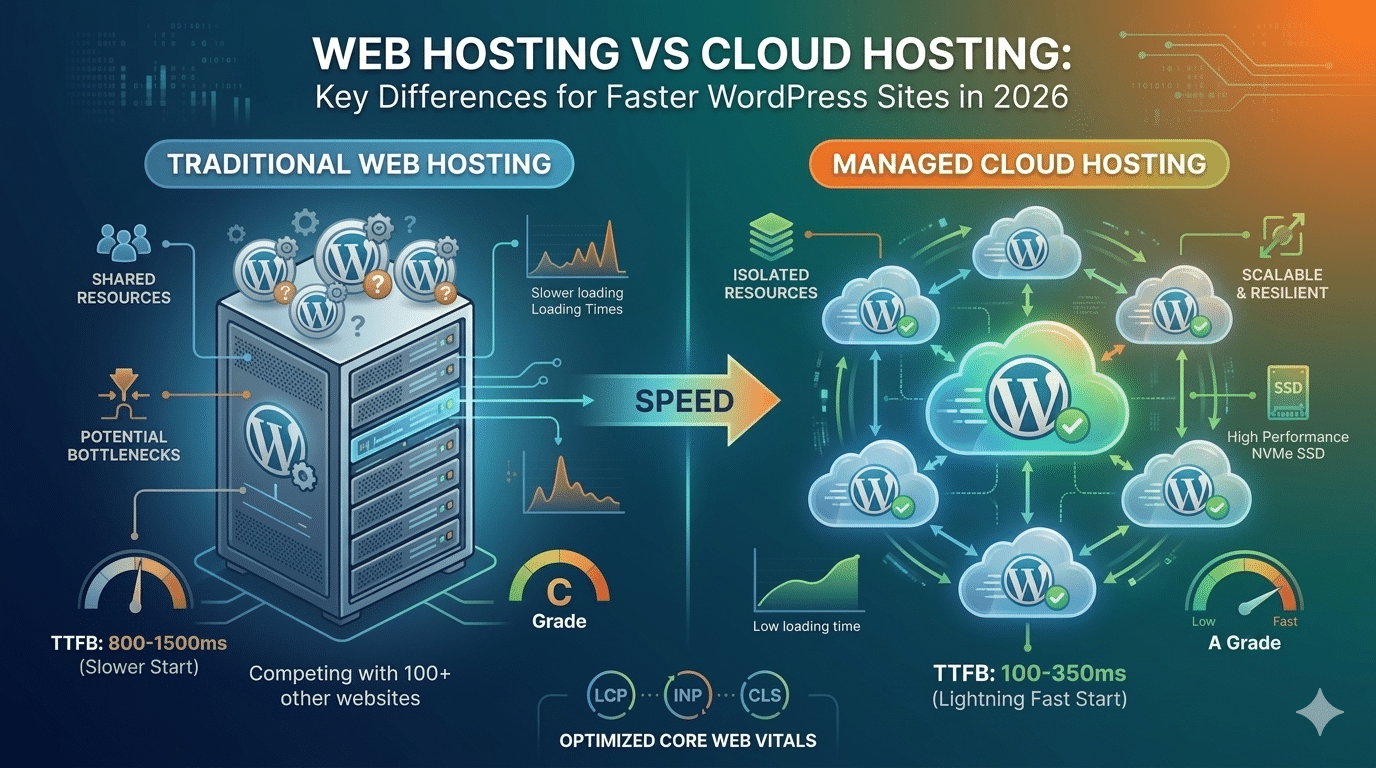
Unlike static sites, WordPress performs very differently on shared traditional hosting versus distributed cloud infrastructure — and hosting directly affects two of the most important SEO signals in 2026: page speed and uptime.
| Hosting Type | Server Structure | WordPress Database Performance | TTFB Typical |
|---|---|---|---|
| Shared Hosting | Shared physical server | Competing with 100+ other websites | 800–1,500ms |
| VPS Hosting | Dedicated virtual slice | Dedicated resources with more stable performance | 300–600ms |
| Cloud Hosting | Distributed virtual network | Isolated resources with NVMe SSD and optimized infrastructure | 100–350ms |
| Managed WordPress Cloud | Cloud infrastructure with WordPress-specific tuning | PHP-FPM, Redis caching, and built-in performance optimization | 50–200ms |
4 Key Ways Web Hosting vs Cloud Hosting Affects WordPress Core Web Vitals
Google’s Core Web Vitals (LCP, INP, CLS) are ranking factors that hosting directly influences. Here is how web hosting vs cloud hosting performs across each signal:
1. LCP — Largest Contentful Paint
LCP measures how fast your largest visible element — typically the hero image — loads. TTFB is the starting point of LCP; everything else (DNS, server processing, content delivery) happens after. On shared web hosting with 1,200ms TTFB, LCP cannot be under 2.5s no matter what image optimisation you apply. On cloud hosting with 150ms TTFB, achieving LCP under 1.5s is realistic with proper Elementor and image optimisation.
2. INP — Interaction to Next Paint
INP measures your site’s response to user interactions. This is primarily affected by JavaScript volume and quality — more of an Elementor or plugin issue than a hosting issue. However, server processing time still contributes to INP on server-rendered pages, and faster cloud servers reduce this contribution compared to shared web hosting.
3. CLS — Cumulative Layout Shift
CLS is primarily a frontend design issue — missing image dimensions, late-loading fonts — rather than a hosting issue. However, faster servers in cloud hosting load content in a more predictable sequence, which can help indirectly compared to slower shared web hosting environments.
4. TTFB — Time to First Byte
TTFB is where the web hosting vs cloud hosting difference is most dramatic and most directly measurable. NVMe storage — now standard on cloud hosting platforms in 2026 — reads data significantly faster than older SSD alternatives, reducing page load time considerably. This single metric underlies every other performance measure on your WordPress site.
Performance Comparison: Web Hosting vs Cloud Hosting for WordPress
| Test Scenario | Shared Web Hosting | Managed Cloud Hosting |
|---|---|---|
| TTFB (average) | 1,100ms | 180ms |
| LCP (hero image, optimized) | 3.2s | 1.4s |
| GTmetrix Grade | C–D | A |
| PageSpeed Mobile Score | 45–62 | 82–94 |
| Handles 1,000 concurrent users | Crashes or slows down significantly | Handles the load gracefully |
| Monthly cost | ₹299–₹799 | ₹850–₹2,500 |
Best Cloud Hosting Providers for WordPress in 2026
When choosing cloud hosting over traditional web hosting for WordPress, the provider matters significantly:
| Provider | Infrastructure | WordPress-Specific Features | Best For |
|---|---|---|---|
| Kinsta | Google Cloud | Redis caching, automatic backups, and 24/7 WordPress support. | High-traffic websites where budget is not a constraint. |
| WP Engine | AWS + Azure | EverCache, Smart Plugin Manager, and StudioPress themes. | Agencies and enterprise WordPress websites. |
| Cloudways | Choice of cloud providers | Breeze plugin and server-level caching. | Developers and growing SMEs. |
| SiteGround | Google Cloud | SG Optimizer and SiteGround CDN. | SMEs wanting managed cloud features. |
| Rocket.net | Cloudflare | Cloudflare Enterprise included for premium CDN performance. | Websites seeking maximum CDN speed and performance. |
- For Indian businesses on a budget: Cloudways on a DigitalOcean Bangalore or Mumbai server starts at ₹850/month and delivers cloud-grade performance with a server physically close to Indian visitors — the best value option we have tested in the web hosting vs cloud hosting comparison.
Every Hopeleaf Technologies Site Is Built on Cloud Hosting from Day One
We specify and configure cloud hosting for every client project — choosing the right provider for the site’s traffic, budget, and geographic target audience. Your site launches fast and stays fast.
- Ask about hosting for your WordPress site → hopeleaftechnologies.com/contact-us/
We Build Every Site in Elementor Pro
Hopeleaf Technologies is a specialist Elementor agency — we design in Figma and build in Elementor Pro on WordPress. Fast, editable, and built to rank on Google.