If your SEO audit tool is reporting ‘multiple meta description tags’ or ‘duplicate meta descriptions’, your WordPress site has a technical SEO issue that’s almost certainly hurting your click-through rate from Google Search — and potentially your rankings.
This guide explains exactly what causes duplicate meta description tags, why they matter, and the step-by-step process to fix them permanently in WordPress.
What Is a Meta Description and Why Does It Matter?
A meta description is an HTML tag in your page’s <head> that provides a brief summary of the page’s content. It typically appears in Google Search results as the 2-line snippet below the page title. While Google doesn’t always use your meta description (it sometimes generates its own), a well-written meta description significantly improves your click-through rate from search results.
What Causes Duplicate Meta Description Tags?
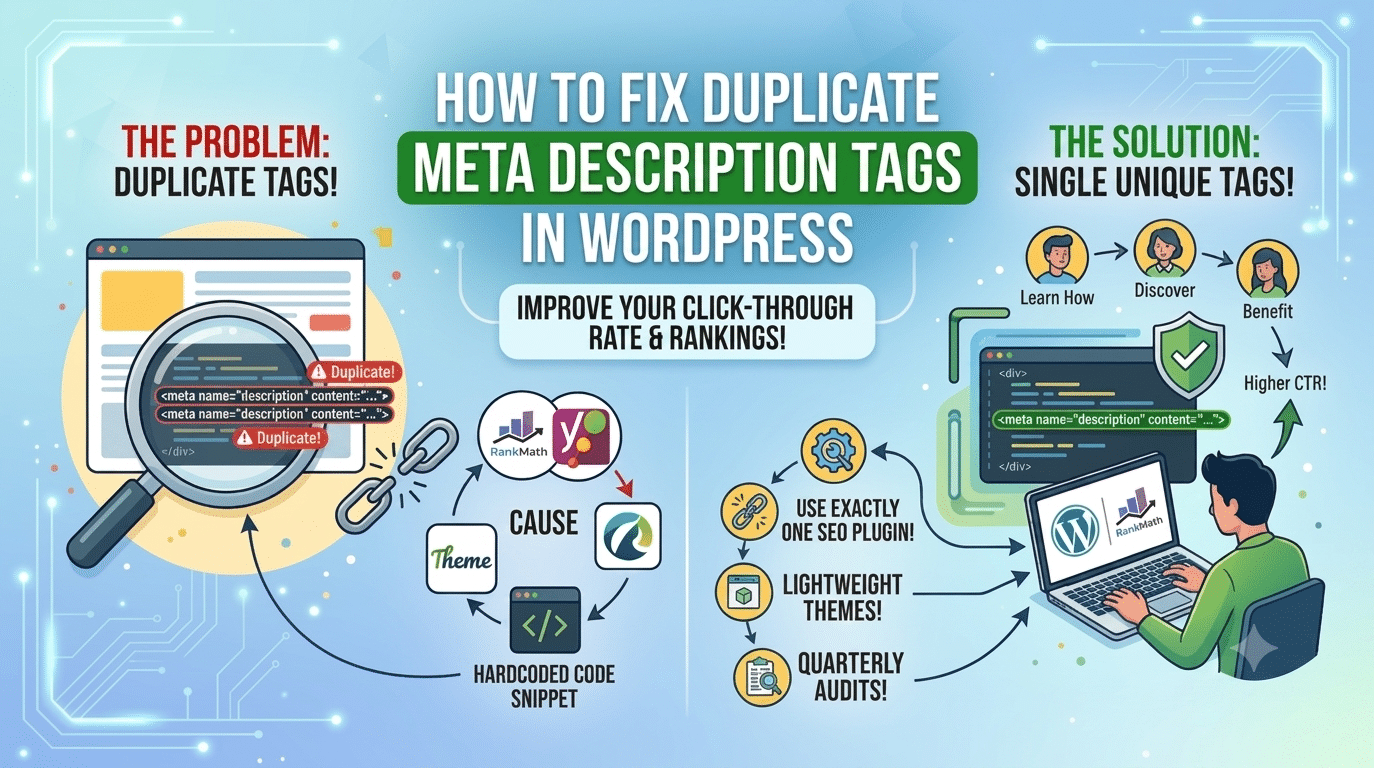
Duplicate meta descriptions in WordPress are typically caused by one of these four issues:
| Cause | How It Happens |
|---|---|
| Two SEO plugins installed | Both Yoast and RankMath active simultaneously — each outputs its own meta tag |
| Theme outputting its own meta | Your WordPress theme has built-in SEO meta output that conflicts with your SEO plugin |
| Hardcoded meta in header.php | A developer manually added meta descriptions to the theme’s header.php file |
| Page builder adding meta | Some page builders (older Elementor versions) output their own meta in certain configurations |
| No unique meta descriptions set | Multiple pages using the same auto-generated description based on site tagline |
Step-by-Step Fix
| # | Step | Description |
|---|---|---|
| 01 | Identify the duplicate | Open any page on your site, right-click > View Page Source (Ctrl+U). Search for ‘meta name=”description”‘. If you see this tag more than once, you have confirmed duplicates. Note which content each tag shows. |
| 02 | Check which plugins output meta | Check Plugins > Installed Plugins. If you have both Yoast SEO and RankMath (or any other SEO plugin) active at the same time — deactivate all but one immediately. Two SEO plugins is the most common cause. |
| 03 | Check your theme | In your theme’s functions.php or header.php, search for ‘meta name=”description”‘. If found, delete those lines. If you’re using a child theme, check both the child and parent theme files. |
| 04 | Disable theme meta output | Many themes have a setting to disable their built-in SEO output. Check Appearance > Customise or your theme’s settings panel for an option like ‘SEO’ or ‘Meta Tags’. Disable it and let your SEO plugin handle all meta output. |
| 05 | Configure RankMath | Install and configure RankMath Pro as your single SEO plugin. Go to RankMath > General Settings > Titles & Meta. Ensure ‘Add Meta Description’ is enabled. This tells RankMath to handle all meta output. |
| 06 | Verify the fix | After making changes, view source on the same page again. Search for ‘meta name=”description”‘. You should now see exactly ONE instance of this tag. |
| 07 | Write unique descriptions | The audit report ‘multiple pages with same meta description’ also flags pages with no unique description — they all default to the site tagline. Go to each important page in WordPress, open RankMath in the sidebar, and write a unique 150–160 character description for every page. |
How to Write a Good Meta Description
After fixing the technical duplicate issue, the next step is ensuring every page has a unique, compelling meta description. Good meta descriptions:
- Are 150–160 characters long (check the character count in RankMath)
- Include the page’s focus keyword naturally — don’t force it
- Describe what the visitor gets — the benefit of clicking, not just what the page is
- Include a soft call to action — ‘Learn how’, ‘Discover’, ‘Find out’
- Are unique — no two pages should have the same description
| Type | Example |
|---|---|
| Too generic | Learn more about our services and how we can help your business. |
| Better | WordPress and Elementor website development by Hopeleaf Technologies, Surat — fixed price, 24-hour response, 150+ projects delivered. |
| Too long | Anything over 160 characters will be cut off in Google Search results with an ellipsis, which reduces click-through rate and looks unprofessional. |
Preventing Duplicate Meta Descriptions in Future
- Use exactly ONE SEO plugin — either RankMath Pro or Yoast SEO, never both
- Use a lightweight starter theme like Hello Theme (Elementor) that has no built-in SEO output
- Audit your site quarterly using Google Search Console or Screaming Frog for any new duplicate meta issues
- Set a site-wide default meta description pattern in RankMath for page types that don’t have individual descriptions — this prevents the ‘no description’ issue that causes Google to generate its own (often poorly chosen) snippet
- Quick check: if your site has 27 pages with duplicate meta descriptions (as flagged in your SEO audit), open Google Search Console > Coverage > Excluded. Pages listed as 'Duplicate without user-selected canonical' confirm that Google has identified the duplication and may be suppressing these pages from rankings.
We Configure RankMath SEO Correctly on Every WordPress Site We Build
Hopeleaf Technologies sets up RankMath Pro with unique meta titles and descriptions on every page, schema markup, Search Console integration, and XML sitemaps — before launch, as standard.
- Get a properly SEO-configured WordPress site → hopeleaftechnologies.com/contact-us/
We Build Every Site in Elementor Pro
Hopeleaf Technologies is a specialist Elementor agency — we design in Figma and build in Elementor Pro on WordPress. Fast, editable, and built to rank on Google.