Website redesign SEO is where good intentions go to die if you skip it. Here’s the redesign horror story we hear a few times every year: a business launches a beautiful new website — and their Google traffic falls off a cliff. Enquiries dry up for months. The culprit is almost never the new design itself; it’s that years of accumulated SEO value (URLs, content, internal links) was thrown away with the old site.
The frustrating part? Preserving rankings through a redesign is a known, systematic website redesign SEO process. This is the checklist we run on every redesign project — use it to protect yours, or to audit the agency you’re hiring.
First: Signs Your Website Redesign SEO Plan Is Overdue
A redesign is justified when the site is genuinely holding the business back:
- It looks dated next to competitors and visitors bounce
- It fails on mobile, where most of your traffic lives
- It’s slow — failing Core Web Vitals and losing rankings to faster rivals
- You can’t edit it yourself, or it’s built on a platform you’ve outgrown
- Your business has changed and the site no longer reflects what you sell
If the design is fine but traffic is weak, you may need SEO and content work, not a rebuild — an honest agency will tell you which.
Phase 1: Before Anyone Designs Anything
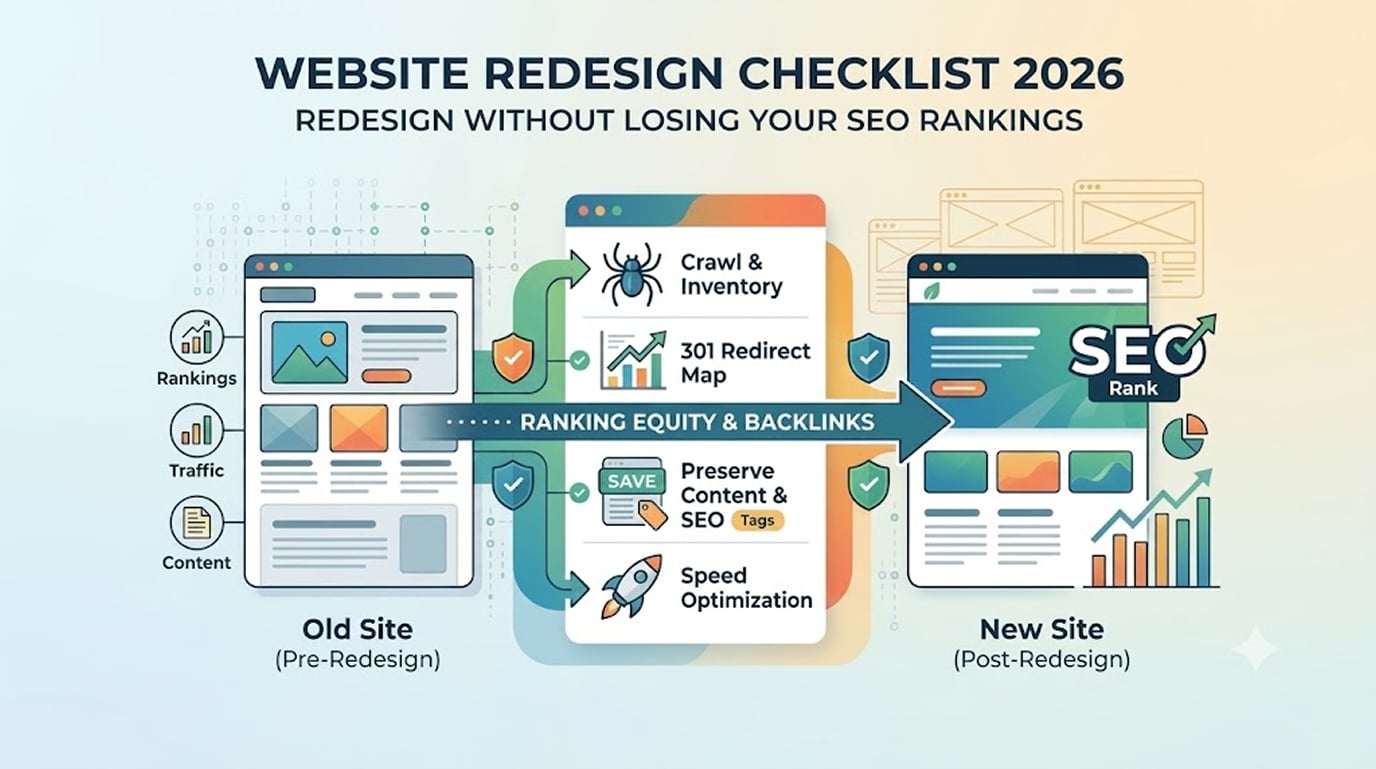
- Crawl and inventory the current site. Export every URL (a crawler like Screaming Frog, or your sitemap). You cannot redirect pages you don’t know exist — and every forgotten URL is a future 404 bleeding authority.
- Record what currently ranks and earns. From Google Search Console and analytics, list your top pages by organic traffic, the queries they rank for, and the pages that generate enquiries or sales. These are your crown jewels: their content and target keywords must survive intact, whatever happens to the visuals.
- Map your backlinks. Pages with external links pointing at them carry authority. Identify them (Search Console’s links report is free) — deleting or renaming them without redirects torches that authority.
- Decide the new URL structure — and change as little as possible. The single best decision in any website redesign SEO plan: keep URLs the same wherever you can. A URL that keeps its address keeps its history. Where changes are unavoidable, they go in the redirect map (next phase).
Phase 2: Website Redesign SEO Work During the Build
- Build the 301 redirect map. A spreadsheet: every old URL → its new equivalent. One-to-one wherever possible; redirect removed pages to the closest relevant page, not the homepage (bulk homepage redirects are treated as soft 404s, per Google’s own guidance on redirects). This spreadsheet is the redesign’s SEO insurance policy.
- Preserve on-page SEO elements. For every important page, carry over (or deliberately improve): title tags, meta descriptions, H1s and heading structure, body content targeting its keywords, image alt text, and internal links. “The new design is cleaner” must never mean “we deleted 800 words that were ranking.”
- Rebuild internal linking. New navigation and pages change how authority flows. Ensure your money pages remain within a click or two of the homepage and are linked contextually from related content.
- Match or beat the old site’s speed.A gorgeous redesign that’s slower than the old site is an SEO downgrade. Set Core Web Vitals targets in the project scope (ours: sub-2s LCP, INP under 200ms) — see our Core Web Vitals guide for the specifics.
- Build on staging, blocked from Google. The development site must be noindexed or password-protected — and that block must be removed at launch (see step 10; forgetting it is the most catastrophic checkbox in web development).
Phase 3: Website Redesign SEO on Launch Day
- The go-live sequence:
- Take a final backup of the old site
- Deploy, then immediately remove the noindex/”discourage search engines” setting
- Activate the full 301 redirect map
- Submit the new XML sitemap in Search Console
- Verify robots.txt isn’t blocking anything important
- Spot-check 20–30 old URLs from your inventory: every one should land on the right new page, no 404s, no redirect chains
- Re-verify analytics and Search Console tracking on the new site
- Test the money paths: forms, phone links, checkout
Phase 4: The First 90 Days of Website Redesign SEO Monitoring
- Watch Search Console like a hawk. Check the Coverage/Pages report weekly for 404 spikes and fix them with redirects. Some ranking wobble for 2–6 weeks post-launch is normal while Google re-crawls; sustained decline means something on this checklist was missed — usually redirects or removed content.
- Compare against your Phase-1 baseline. That’s why you recorded it: within 60–90 days, organic traffic to your crown-jewel pages should match or beat pre-launch numbers. Done properly, redesigns gain traffic — better speed, structure, and content usually outrank the old site within a quarter.
Frequently Asked Questions
Will I lose rankings during a redesign?
Minor fluctuation for a few weeks is normal. Lasting losses come from missing redirects, deleted content, changed URLs, or a slower site — all preventable with this checklist.
How long do 301 redirects need to stay in place?
Effectively permanently — at minimum a year. They cost nothing to keep and protect old backlinks forever.
Should I redesign and change domain at the same time?
Avoid it if possible; each is a manageable migration, but combined they multiply risk and muddy diagnosis if traffic dips.
Does your agency handle all of this?
Planning a Website Redesign SEO Overhaul and Can't Afford a Traffic Dip?
We migrate rankings, redirects, and content as standard.
- Request a Free Redesign Audit → hopeleaftechnologies.com/contact-us/
We Build Every Site in Elementor Pro
Hopeleaf Technologies is a specialist Elementor agency — we design in Figma and build in Elementor Pro on WordPress. Fast, editable, and built to rank on Google.