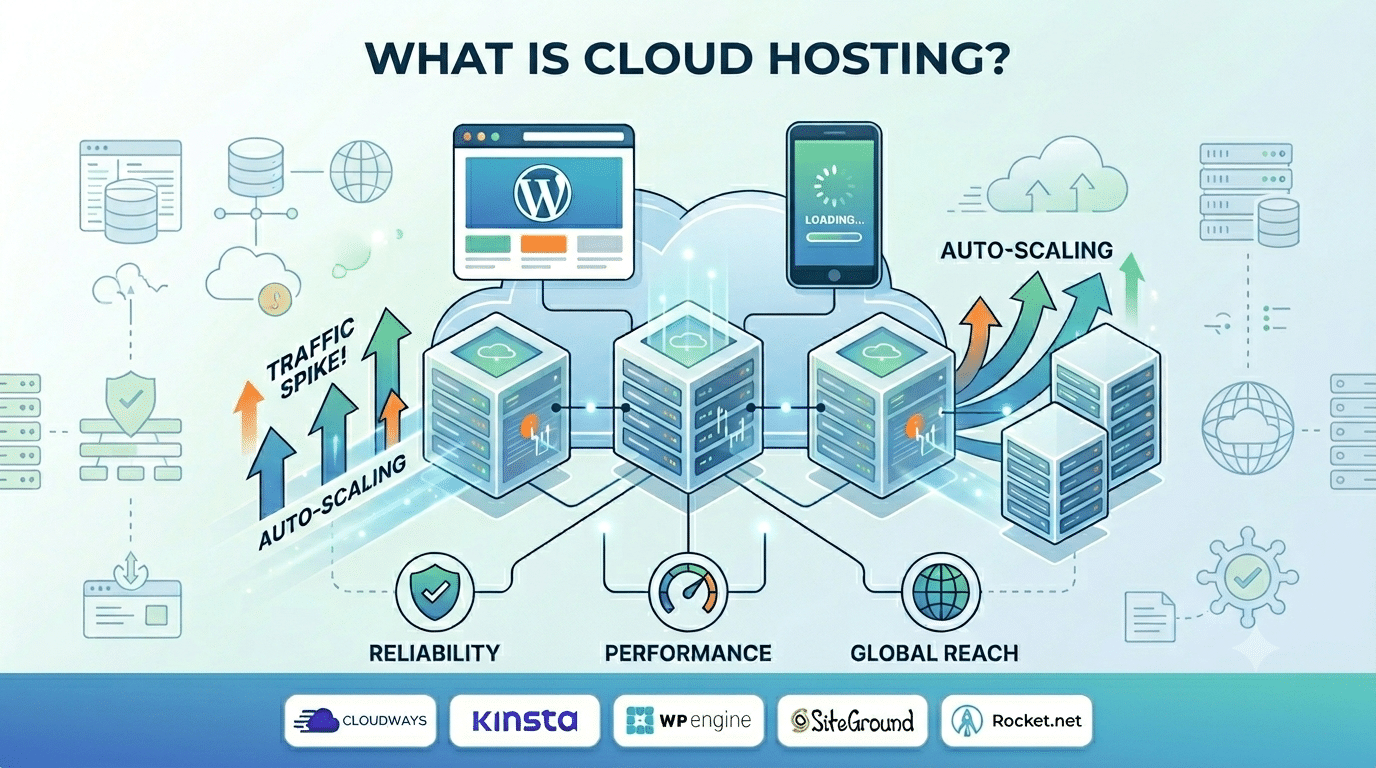
Cloud web hosting is a type of web hosting where your website runs on a network of interconnected virtual servers — rather than a single physical machine. Instead of your website living on one server in one data centre, it is distributed across multiple servers that work together to deliver fast, reliable performance.
If you have been comparing hosting options for your WordPress site, you have almost certainly encountered cloud web hosting as a premium option above shared hosting and VPS. This guide explains exactly what makes it different, how the technology works, and when it is the right choice.
The Four Main Types of Web Hosting — Where Cloud Fits
| Hosting Type | How It Works | Cost / Month | Best For |
|---|---|---|---|
| Shared Hosting | Multiple websites share one physical server. | ₹149–₹999 | Small blogs and starter websites. |
| VPS Hosting | A dedicated portion of a physical server with isolated resources. | ₹500–₹3,000 | Developers and medium-sized websites. |
| Cloud Web Hosting | Runs across multiple virtual servers for high availability and scalability. | ₹850–₹10,000 | Business websites, WooCommerce stores, and growing sites. |
| Dedicated Hosting | An entire physical server dedicated to your website. | ₹5,000–₹50,000 | Enterprise websites and very high-traffic applications. |
How Cloud Web Hosting Actually Works
At its technical core, cloud web hosting uses virtualisation technology to divide large physical servers into multiple virtual machines. These virtual machines are connected into a cluster — a ‘cloud’. When you sign up for cloud web hosting:
- Your website files and database are distributed across this cluster of virtual servers
- A load balancer distributes incoming traffic across servers to prevent any single server from being overwhelmed
- If one server in the cluster fails or becomes overloaded, traffic is automatically redirected to another
- When traffic spikes, the cloud allocates additional resources from the broader network
- When traffic returns to normal, resources are released and your cost decreases
From a visitor’s perspective, this process is invisible. They request a page, the cloud web hosting infrastructure handles it with whatever resources are available, and the page loads. The complexity lives in the infrastructure layer — not in anything a site owner needs to manage.
According to Google’s Core Web Vitals documentation, server response time directly impacts your LCP score — an official Google ranking factor. Choosing cloud web hosting is not just a technical decision; it is an SEO decision.
Cloud Web Hosting vs Shared Hosting — The Key Differences
| Comparison | Shared Hosting | Cloud Web Hosting |
|---|---|---|
| Server structure | Single physical server shared by multiple websites. | Network of virtual servers working together. |
| Resource sharing | Resources are shared with other websites. | Isolated, dedicated resources for your website. |
| Performance | Variable — affected by neighboring websites. | Consistent — unaffected by other users. |
| Traffic spikes | Site may slow down or crash. | Automatically scales to handle increased traffic. |
| Uptime guarantee | 99%–99.5% typical. | 99.9%–99.99% typical. |
| TTFB | 800ms–1,500ms typical. | 100–350ms typical. |
| Cost | ₹149–₹999/month | ₹850–₹10,000/month |
5 Powerful Reasons to Switch to Cloud Web Hosting
1. Automatic Scaling During Traffic Spikes
Cloud web hosting automatically allocates more CPU and RAM when your site experiences a sudden surge in visitors — whether from a product launch, a viral post, or a seasonal sale. Shared hosting crashes under the same conditions.
2. Consistent Performance With Isolated Resources
On shared hosting, one neighbour site’s traffic spike slows yours down. Cloud web hosting gives your site isolated, dedicated resources — your performance is never affected by other sites on the same infrastructure.
3. Superior Uptime — 99.9% and Above
Because cloud web hosting distributes your site across multiple servers, there is no single point of failure. If one server goes down, another immediately takes over. Most cloud providers back this with SLA guarantees of 99.9%–99.99% uptime.
4. Faster TTFB and Better Core Web Vitals
Cloud web hosting delivers TTFB of 100–350ms compared to 800–1,500ms on shared hosting. This directly improves your LCP score — one of Google’s confirmed Core Web Vitals ranking signals.
5. Global CDN Integration
Leading cloud web hosting providers like Cloudways, Kinsta, and WP Engine integrate built-in CDNs that serve your static assets from servers closest to each visitor — reducing load times for international audiences significantly.
When Should You Use Cloud Web Hosting?
Switch to Cloud When Your Site Does Any of These:
- Runs a WooCommerce store with regular transactions, reliability and uptime directly affect revenue
- Runs Google Ads or Meta Ads sending paid traffic to landing pages, a slow or down page wastes every rupee of ad spend
- Has grown beyond 10,000 monthly visitors, shared hosting typically struggles at this scale
- Experiences seasonal traffic spikes, cloud auto-scales for Black Friday, Diwali sales, product launches
- Is a client-facing site for a professional services business, downtime damages trust and reputation
Shared Hosting Is Still Fine When:
- Your site is a personal blog with under 5,000 monthly visitors
- What’s interesting is it’s a starter/placeholder site while you build a larger project
- you’re testing a concept before investing in proper infrastructure
Best Cloud Web Hosting Options for WordPress in 2026
Managed cloud web hosting removes the server management burden — the host handles updates, security patches, caching, and backups. Unmanaged cloud (AWS, DigitalOcean, Vultr) requires technical expertise but offers more control at lower cost.
| Host | Type | Starting Price | Notable Feature |
|---|---|---|---|
| Cloudways | Managed Cloud | ₹850/mo | Choice of AWS, DigitalOcean, or Vultr with pay-as-you-go pricing. |
| Kinsta | Managed WordPress Cloud | ₹2,500/mo | Powered by Google Cloud infrastructure with premium support. |
| WP Engine | Managed WordPress Cloud | ₹2,200/mo | EverCache technology and Genesis themes included. |
| SiteGround | Managed Cloud | ₹999/mo | Ultrafast PHP with a Singapore data centre. |
| Rocket.net | Managed WordPress Cloud | ₹1,650/mo | Cloudflare Enterprise included for enhanced speed and security. |
We Recommend the Right Hosting for Every Client WordPress Project
Hopeleaf Technologies advises on cloud web hosting as part of every new project — choosing the right provider for your traffic, budget, and technical needs. We configure it correctly from day one.
- Ask about WordPress hosting t → hopeleaftechnologies.com/contact-us/
We Build Every Site in Elementor Pro
Hopeleaf Technologies is a specialist Elementor agency — we design in Figma and build in Elementor Pro on WordPress. Fast, editable, and built to rank on Google.