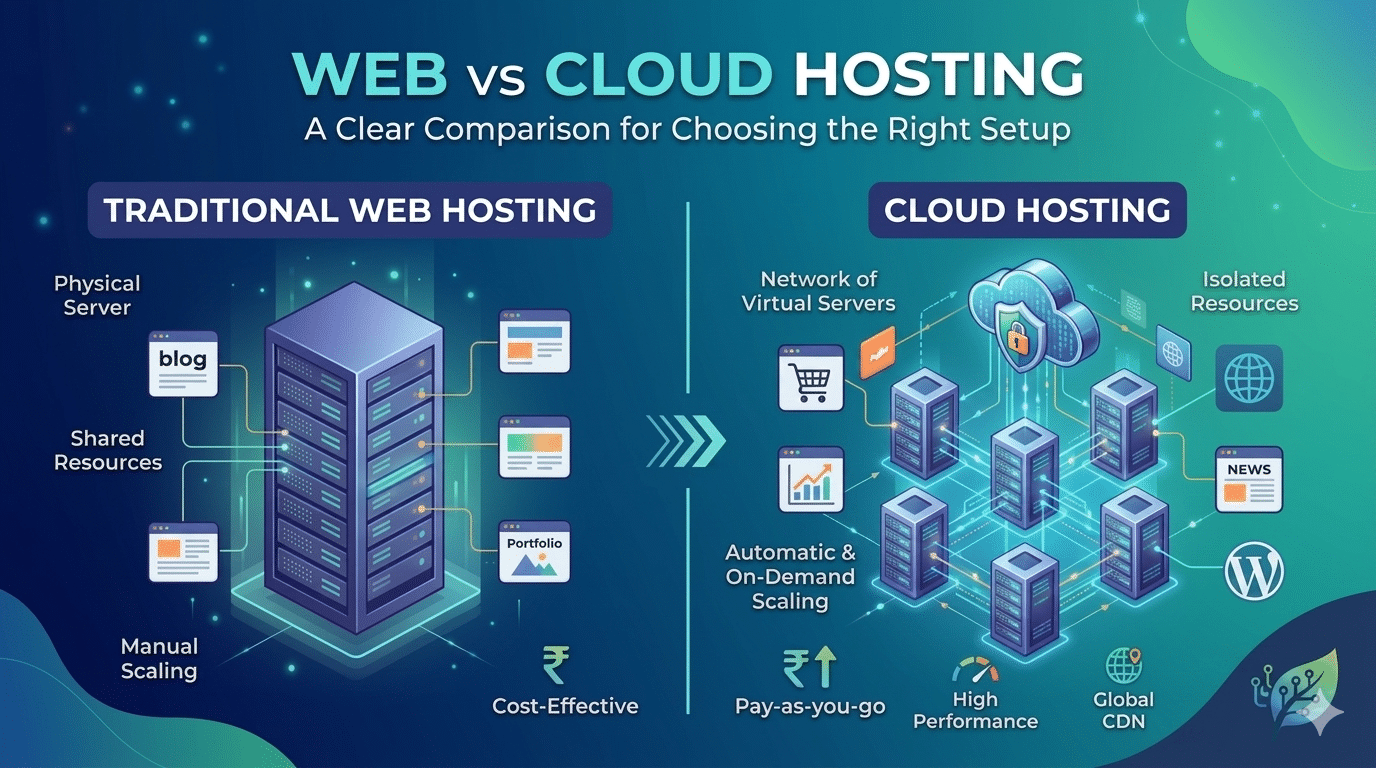
Choosing between web vs cloud hosting is one of the first infrastructure decisions any website owner faces. Get it right from the start and your site performs well as it grows. Get it wrong and you spend months on a slow, unreliable site before eventually migrating anyway.
This comparison is designed to give you a clear answer based on your specific situation — not a “it depends” non-answer.
The Clear Differences in One Table
| Factor | Traditional Web Hosting | Cloud Hosting |
|---|---|---|
| Infrastructure | Single physical server | Network of virtual servers |
| Performance | Variable — shared resources | Consistent — isolated resources |
| Uptime | 99%–99.5% | 99.9%–99.99% |
| Scalability | Manual, requires migration | Automatic, on demand |
| Traffic spikes | Causes slowdowns or crashes | Handled automatically |
| Cost structure | Fixed monthly plan | Fixed or pay-as-you-go |
| Price range | ₹149–₹1,500/month | ₹850–₹10,000/month |
| CDN included | Usually not (add-on) | Usually yes (built-in or add-on) |
| Security | Basic (shared responsibility) | Enterprise-grade (multi-layer) |
| Best for | Small websites, personal blogs, and testing | Business websites, WooCommerce stores, and growing traffic |
Speed — The Most Impactful Difference in Web vs Cloud Hosting
The most important practical difference in the web vs cloud hosting debate is server response speed. In independent testing in 2025–2026:
- Shared web hosting: average TTFB of 900–1,400ms. Google PageSpeed Insights scores typically 40–65 on mobile.
- Managed cloud hosting: average TTFB of 100–250ms. PageSpeed Insights scores typically 80–95 on mobile.
A WordPress site on managed cloud hosting consistently passes Core Web Vitals. The same site on shared hosting rarely does — regardless of what caching plugins or image optimisation you apply, because the bottleneck is the server response time itself.
Cost — The Trade-Off Explained
Traditional web hosting wins on price. ₹149–₹299/month for shared hosting vs ₹850–₹2,500/month for managed cloud. But this comparison misses the real calculation:
- A business website generating ₹1,00,000/month in leads that converts 0.5% better on a fast cloud-hosted site generates ₹500 additional value per month — more than covering the hosting upgrade.
- A WooCommerce store that goes down for 2 hours due to a traffic spike on shared hosting during a Diwali sale costs far more in lost revenue than a full year of cloud hosting.
- The annual cost of managed cloud hosting (₹10,000–₹30,000) is usually a rounding error on any realistic business website budget.
Security — Cloud Hosting Has a Genuine Advantage
When comparing web vs cloud hosting on security, cloud hosting providers invest heavily at the infrastructure level: network-level DDoS mitigation, automated threat detection, physical data centre security, and geographic redundancy for disaster recovery. On shared hosting, a security compromise on one neighbouring site can potentially affect your site too.
For WordPress specifically, managed cloud hosting providers (Kinsta, WP Engine, SiteGround) also handle automatic WordPress core updates, plugin update monitoring, and malware scanning as part of the managed service.
The Decision Framework — Web or Cloud Hosting?
| Your Situation | Right Choice |
|---|---|
| Personal blog with under 5,000 visitors/month | Shared web hosting — the most cost-effective option. |
| Business website generating leads or revenue | Cloud hosting — better performance delivers higher ROI. |
| WooCommerce store with regular transactions | Managed cloud WordPress hosting — essential for speed and reliability. |
| Running Google Ads to landing pages | Cloud hosting — faster pages improve conversions and reduce wasted ad spend. |
| Current site on shared hosting with poor performance | Migrate to cloud hosting for the biggest performance improvement. |
| International audience across multiple countries | Cloud hosting with a CDN for faster global content delivery. |
| Development or staging environment | VPS or low-cost cloud hosting for a production-like environment. |
We Specify the Right Hosting Setup for Every WordPress Project
Hopeleaf Technologies doesn’t use one-size-fits-all hosting. Whether the answer is web hosting or cloud hosting, we recommend the right provider, server location, and configuration for each client’s traffic, budget, and geographic audience.
- Discuss your hosting setup → hopeleaftechnologies.com/contact-us/
We Build Every Site in Elementor Pro
Hopeleaf Technologies is a specialist Elementor agency — we design in Figma and build in Elementor Pro on WordPress. Fast, editable, and built to rank on Google.