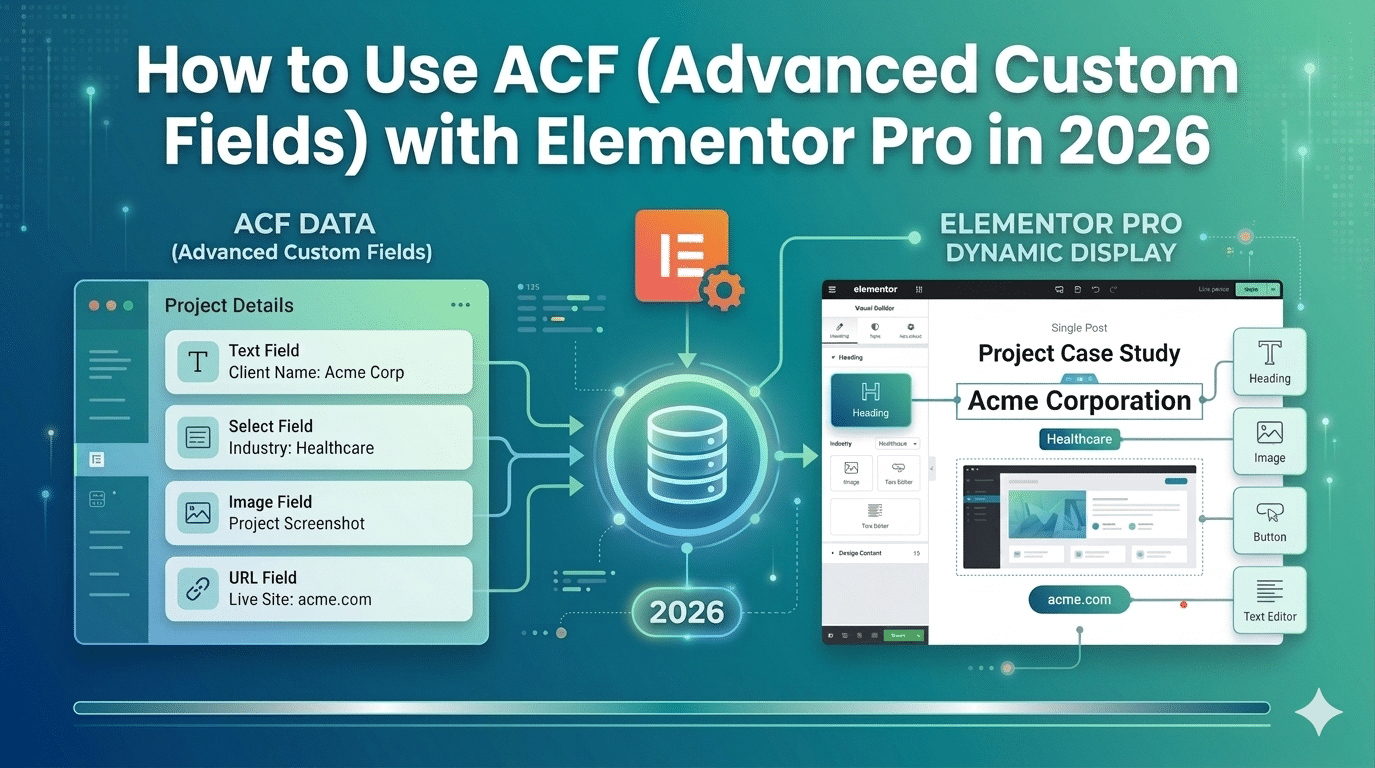
Most WordPress sites display content one of two ways: hardcoded into the Elementor canvas (fast to build, hard to manage at scale) or pulled from the WordPress post title and content fields (flexible but limited in structure). Advanced Custom Fields is the bridge between these two, it lets you store structured data in WordPress and display it dynamically through Elementor.
The combination of ACF + Elementor Pro’s Dynamic Content system is how professional agencies build WordPress sites that are both beautifully designed and genuinely scalable. A portfolio card that automatically displays the client name, industry, and project URL from ACF fields. A team member section where each person’s role, phone, and LinkedIn are stored in Advanced Custom Fields and displayed in a consistent Elementor template. This guide shows you exactly how.
What is Advanced Custom Fields and What Does It Do?
ACF is a free WordPress plugin that lets you add custom data fields to any post, page, or custom post type. Instead of cramming everything into the WordPress content editor, you create structured field groups, exactly like a database schema for your content.
| Field Type | What It Stores | Example Use |
|---|---|---|
| Text | Single line text | Client name, project title |
| Textarea | Multi-line text | Short project description |
| Image | Image from media library | Project screenshot, team photo |
| URL | Web address | Live project URL, LinkedIn profile |
| Select | Dropdown option | Industry, project type, status |
| True/False | On/off toggle | Featured project, active team member |
| Date | Calendar date | Project completion date, event date |
| Repeater (Pro) | Repeatable field groups | Multiple award entries, service list |
| Flexible Content | Dynamic layout blocks | Page builder alternative |
Practical Setup: Portfolio Posts with Advanced Custom Fields + Elementor
Step 1 — Create a Custom Post Type
Install CPT UI and create a ‘Projects’ post type (as covered in Post 03 of this series). This gives you a dedicated Projects section in your WordPress admin.
Step 2 — Create an Advanced Custom Fields Field Group
- Install Advanced Custom Fields Free from Plugins > Add New (search ‘Advanced Custom Fields’)
- Go to Custom Fields > Add New in your WordPress admin
- Name the field group ‘Project Details’
- Add fields: Client Name (Text), Industry (Select — add options: Healthcare, Beauty, Real Estate, etc.), Location (Text), Live URL (URL), Scope of Work (Textarea), Year Completed (Number)
- Under Location Rules, set: Show this field group if Post Type = Projects
- Click Publish
Now when you create or edit a Project post in WordPress, you’ll see these fields below the standard editor.
Step 3 — Add Data to Your Projects
Go to Projects > Add New. Fill in the post Title (project name), Featured Image (screenshot), and all ACF fields. Save. Repeat for each project in your portfolio.
Step 4 — Display ACF Data in Elementor Using Dynamic Content
Go to Templates > Theme Builder > Add New Single template. Set display conditions to Post Type = Projects. In the Elementor editor, add a Heading widget. Click the dynamic icon (database icon) next to the Text field. Select Advanced Custom Fields Field > Client Name. The widget now automatically displays the Client Name Advanced Custom Fields field value for whichever Project post is being viewed.
Repeat for every Advanced Custom Fields field you want to display: Image widget > Dynamic > Featured Image, Text widget > Dynamic > ACF Field > Location, Button widget > Dynamic link > ACF Field > Live URL.
- Use the Elementor Loop Grid widget with a custom Loop Item skin to display all your Projects in a grid on the portfolio page. The Loop Item uses Dynamic Content to pull each project's data, so the grid populates automatically as you add new projects.
Common ACF + Elementor Use Cases
- Team member pages — role, phone, LinkedIn, headshot all in Advanced Custom Fields fields, displayed in a consistent Elementor card
- Property listings — bedrooms, bathrooms, price, area in Advanced Custom Fields, displayed in Elementor property cards
- Service pages — pricing, features list, CTA URL in Advanced Custom Fields used across multiple service templates
- Events — date, location, registration URL in Advanced Custom Fields, displayed in an Elementor events grid
We Build ACF + Elementor Pro Sites That Scale
Hopeleaf Technologies uses ACF+ Elementor Pro Dynamic Content on portfolio sites, real estate platforms, team directories, and complex custom post type projects. Book a consultation to discuss your build.
- Start your project → hopeleaftechnologies.com/contact-us/
We Build Every Site in Elementor Pro
Hopeleaf Technologies is a specialist Elementor agency — we design in Figma and build in Elementor Pro on WordPress. Fast, editable, and built to rank on Google.