Cloud hosting for WordPress has become the go-to infrastructure choice for business websites that demand speed, reliability, and room to grow. When someone says their website is ‘hosted on cloud’, they mean it runs on a network of interconnected virtual servers distributed across multiple data centres — rather than a single physical machine in one location. For WordPress site owners, this distinction has direct, measurable consequences for speed, reliability, and the ability to handle growth.
This guide explains exactly what cloud hosting for WordPress means for your site’s performance and scalability — in plain language, with real examples.
What 'Hosted on Cloud' Actually Means
Traditional web hosting puts your WordPress site on a single physical server. If that server experiences high demand, fails, or is located far from your visitors, your site slows down or goes offline. Cloud hosting for WordPress replaces that single server with a network of virtual servers — your site’s data and resources are distributed across multiple machines, often in multiple geographic locations.
When one server in the network is under pressure or fails, another takes over automatically. When your site needs more CPU or RAM to handle a traffic spike, the cloud allocates additional resources from the network — often within seconds — without any manual intervention from you or your hosting provider.
Why Cloud Hosting for WordPress Outperforms Shared Hosting
Cloud hosting for WordPress gives your site dedicated, isolated resources — something shared hosting simply cannot offer. On shared hosting, your site competes with hundreds of neighbouring sites for the same CPU, RAM, and bandwidth. One traffic spike on a neighbour’s site can slow yours down instantly. Cloud hosting eliminates this problem entirely.
According to Google’s Core Web Vitals documentation, server response time is a direct factor in LCP scores — which are now an official Google ranking signal. Faster hosting is not just a user experience improvement; it is an SEO advantage.
5 Ways Cloud Hosting for WordPress Improves Performance
1. Lower Time to First Byte (TTFB
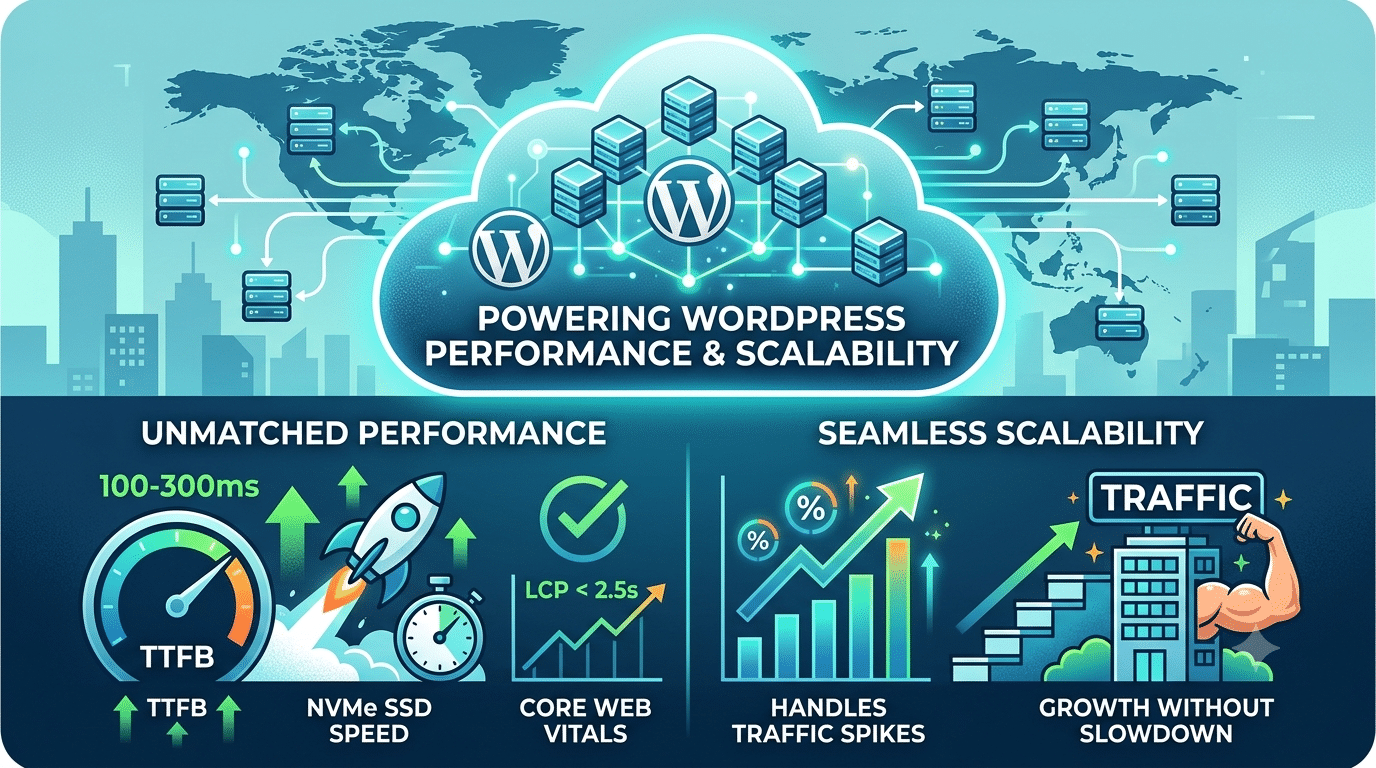
TTFB — the time from when a browser sends a request to when it receives the first byte of your page — is one of the strongest predictors of page speed and LCP Core Web Vitals score. On shared hosting, TTFB is typically 800ms–1,500ms because your server is processing requests for hundreds of other sites simultaneously. On cloud hosting for WordPress with proper configuration, TTFB drops to 100–300ms — often halving perceived load time before any other optimisations are applied.
2. CDN Integration, Content Closer to Your Visitors
Cloud hosting providers (Cloudways, Kinsta, WP Engine) integrate their infrastructure with Content Delivery Networks (CDNs) that store copies of your static assets — images, CSS, JavaScript — at server nodes around the world. A visitor in Sydney accessing your Surat-hosted WordPress site no longer waits for files to travel across continents; they load from a nearby CDN node. This directly reduces LCP scores and improves the experience for international visitors.
3. NVMe SSD Storage
Cloud hosting platforms in 2026 use NVMe SSD storage — significantly faster than the SATA SSDs used by most shared hosting providers. Database queries on WordPress (which powers every page load) complete faster on NVMe, translating to faster PHP execution and lower TTFB.
4. Isolated Resources
On shared hosting, your WordPress site competes with dozens or hundreds of neighbouring sites for the same pool of CPU and RAM. A traffic spike on one neighbouring site degrades performance for all others. Cloud hosting for WordPress gives your site isolated, dedicated resources — your performance is unaffected by what other sites on the infrastructure are doing.
5. AI-Powered Server Management
Leading cloud hosting providers in 2026 now use AI-driven infrastructure monitoring that automatically tunes PHP configurations, adjusts memory limits based on traffic patterns, and flags performance issues before users notice any slowdown — giving WordPress sites a level of automated optimisation that shared hosting cannot match.
How Cloud Hosting Enables WordPress Scalability
Scalability is the ability to handle growth — more traffic, more content, more functionality — without a performance penalty. This is where cloud hosting for WordPress most clearly outperforms traditional hosting.
| Scenario | Shared Hosting | Cloud Hosting |
|---|---|---|
| Traffic spike (product launch) | Server overloads, site slows/crashes | Resources auto-scale to handle the spike |
| Growing to 100k monthly visitors | Requires manual upgrade, often migration | Scale resources vertically with one click |
| Adding WooCommerce to existing site | May exceed shared hosting CPU limits | Cloud handles increased DB and PHP load |
| Running paid ads to landing pages | Traffic spikes can crash the shared server | Cloud auto-allocates resources as needed |
| Multiple sites on one account | All share the same slow server | Each site runs on dedicated cloud resources |
Cloud Hosting Options for WordPress in 2026
| Provider | Type | Monthly Cost | Best For |
|---|---|---|---|
| Cloudways | Managed Cloud | ₹850–₹5,000 | Agencies, growing business sites |
| Kinsta | Managed WordPress | ₹2,500–₹20,000 | High-traffic WordPress sites |
| WP Engine | Managed WordPress | ₹2,200–₹15,000 | Enterprise WordPress sites |
| SiteGround | Managed WordPress | ₹999–₹4,000 | SMEs wanting managed cloud features |
| Vultr / DigitalOcean | Unmanaged Cloud | ₹500–₹2,000 | Developers who manage their own servers |
Is Cloud Hosting for WordPress Worth It?
For a personal blog or a very small local business site with predictable, low traffic — shared hosting at ₹299–₹500/month may be perfectly adequate. For any business website that generates leads, runs WooCommerce, or runs Google Ads sending traffic to landing pages — cloud hosting for WordPress is not a luxury, it’s a performance requirement.
The cost difference between shared hosting (₹300/month) and entry-level managed cloud hosting (₹850–₹1,500/month) is often recovered within the first month through improved conversion rates on a faster site.
- Google confirmed Core Web Vitals as ranking factors. A cloud-hosted WordPress site consistently achieving LCP under 2.5 seconds has a measurable SEO advantage over a competitor on slow shared hosting.
Hopeleaf Technologies Builds on Cloud-Ready Hosting Infrastructure
Every WordPress site we build is configured for cloud hosting — whether on Cloudways, SiteGround GoGeek, or Kinsta. We configure WP Rocket, Cloudflare CDN, and WebP images as standard.
- Talk to us about your WordPress hosting → hopeleaftechnologies.com/contact-us/
We Build Every Site in Elementor Pro
Hopeleaf Technologies is a specialist Elementor agency — we design in Figma and build in Elementor Pro on WordPress. Fast, editable, and built to rank on Google.