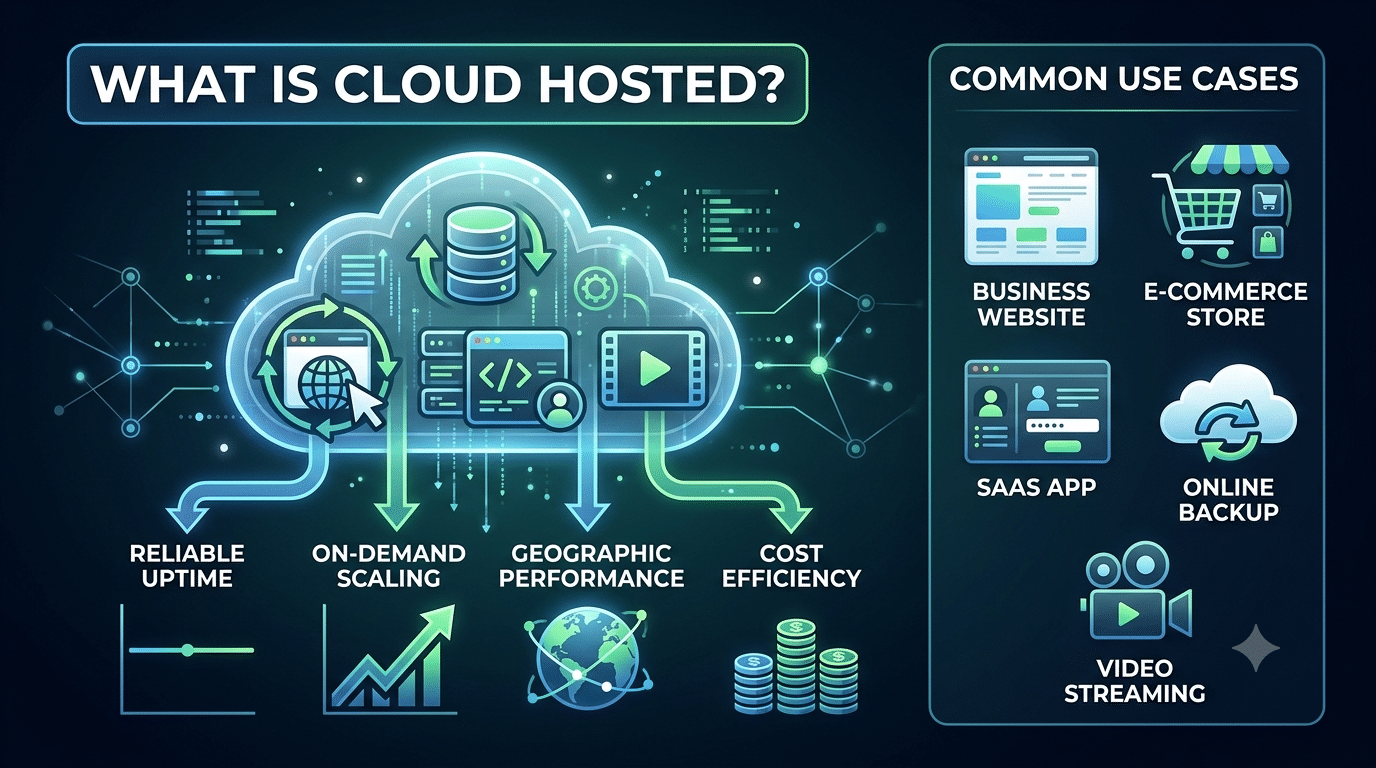
What is cloud hosted? In simple terms, something is cloud hosted when it runs on remote servers accessed via the internet — rather than on a physical computer or server you own and manage yourself. For businesses running websites, software, or storing data, understanding what cloud hosted means can directly impact your performance, uptime, and costs.
This guide gives you a plain-English explanation of what cloud hosted means, why businesses choose it, and the most common use cases where it makes a genuine difference.
KEY STATS — CLOUD & WEB HOSTING 2026
- Global web hosting market projected to grow from $149.3B in 2026 to $527B by 2032 (Fortune Business Insights)
- AWS, Azure, and Google Cloud together hold ~80% of global cloud infrastructure market
- 71% of companies already have 50%+ of their architecture cloud-hosted
- 47% of users expect a website to load in 2 seconds or less — hosting directly determines this
- Downtime costs large organisations an average of $9,000 per minute
What Does 'Cloud Hosted' Mean?
Something is cloud hosted when it runs on remote servers accessed via the internet — rather than on a physical computer or server you own and manage yourself. The ‘cloud’ refers to a network of servers, usually owned and operated by large technology companies (Amazon Web Services, Microsoft Azure, Google Cloud), that deliver computing power, storage, and networking as a service.
When your website, software, or data is cloud hosted:
- It runs on servers in a data centre — not your office or a local machine
- You access it through a web browser or internet connection
- The server infrastructure is managed by the cloud provider — not by you
- Resources (CPU, RAM, storage) can be scaled up or down on demand
- You pay for what you use, rather than owning fixed hardware
According to Google’s Web Vitals documentation, server infrastructure directly affects page speed and Core Web Vitals scores — making your hosting choice an SEO decision, not just a technical one.
Cloud Hosted vs Locally Hosted vs Traditional Hosted
| Feature | Cloud Hosted | Traditional Web Hosting | Locally Hosted |
|---|---|---|---|
| Where it runs | Remote cloud servers | Single shared server | Your own computer/server |
| Access | Browser / Internet | Browser / Internet | Local network or VPN |
| Maintenance | Provider handles infrastructure | Provider handles server | You handle everything |
| Scalability | On-demand, instant | Upgrade plan (manual) | Buy new hardware |
| Uptime | 99.9%+ with redundancy | Varies — 99%–99.9% | Depends on your hardware |
| Cost model | Pay-as-you-go or subscription | Fixed monthly plan | Upfront hardware + IT staff |
| Examples | AWS, Azure, Google Cloud | Bluehost, Hostinger, GoDaddy | Office server, local NAS |
4 Key Benefits of Cloud Hosted Infrastructure
1. Reliability and Uptime
Cloud hosted infrastructure distributes your website or application across multiple servers. If one server fails, others immediately take over — a concept called redundancy. This is why enterprise cloud providers offer Service Level Agreements (SLAs) guaranteeing 99.9% or higher uptime. Traditional hosting on a single physical server has no such redundancy: if the server goes down, your site goes down.
2. On-Demand Scalability
A cloud hosted setup allows you to increase computing resources — CPU, RAM, storage — with a few clicks, or automatically in response to traffic demand. If your e-commerce site receives 10× its normal traffic during a sale, cloud infrastructure allocates additional resources to handle the load. When the sale ends, resources scale back down and your cost returns to normal.
3. Geographic Performance
Major cloud providers operate data centres on multiple continents. This means your cloud hosted website can serve content from a server physically close to each visitor — reducing latency and improving load times globally. For businesses with international audiences, this geographic distribution is a significant performance advantage over traditional hosting where your site lives in one location.
4. Cost Efficiency at Scale
The pay-as-you-go model means you pay only for the resources you actually use. For businesses with variable or seasonal demand, this is significantly more cost-efficient than paying for a dedicated server at full capacity year-round.
Common Use Cases for Cloud Hosted Solutions
| Use Case | Why Cloud Hosted Fits |
|---|---|
| Business website | Reliable uptime, fast load times, and no server management. |
| E-commerce store | Handles traffic spikes during sales and scales automatically during peak seasons. |
| SaaS application | Serves users across multiple geographies and scales as your user base grows. |
| WordPress website | Managed cloud hosting (such as Kinsta or WP Engine) simplifies updates, security, and performance. |
| Email marketing tools | Processes and stores large datasets while delivering emails to millions of recipients. |
| Online backup / storage | Stores files securely with geographic redundancy and high availability. |
| CRM software | Provides secure access to customer data from anywhere on any device. |
| Video streaming | Delivers content globally with low latency and minimal buffering. |
Is Cloud Hosted the Right Choice for Your Business?
- In 2026, 71% of companies already have more than 50% of their architecture cloud hosted. For most business websites and applications, a cloud hosted setup is no longer the premium option — it's the standard.
If your business relies on your website for leads, sales, or customer service, a cloud hosted solution offers the uptime guarantee, scalability, and global performance that traditional hosting simply cannot match. The question is no longer whether to go cloud hosted — it’s which cloud hosted provider is right for your needs.
We Build WordPress Websites Configured for Cloud Hosting
Every Hopeleaf Technologies project is built with cloud-ready performance settings — Cloudflare CDN, WP Rocket caching, WebP images, and hosting on Cloudways or SiteGround managed cloud.
- Get a cloud-optimised WordPress site → hopeleaftechnologies.com/contact-us/
We Build Every Site in Elementor Pro
Hopeleaf Technologies is a specialist Elementor agency — we design in Figma and build in Elementor Pro on WordPress. Fast, editable, and built to rank on Google.