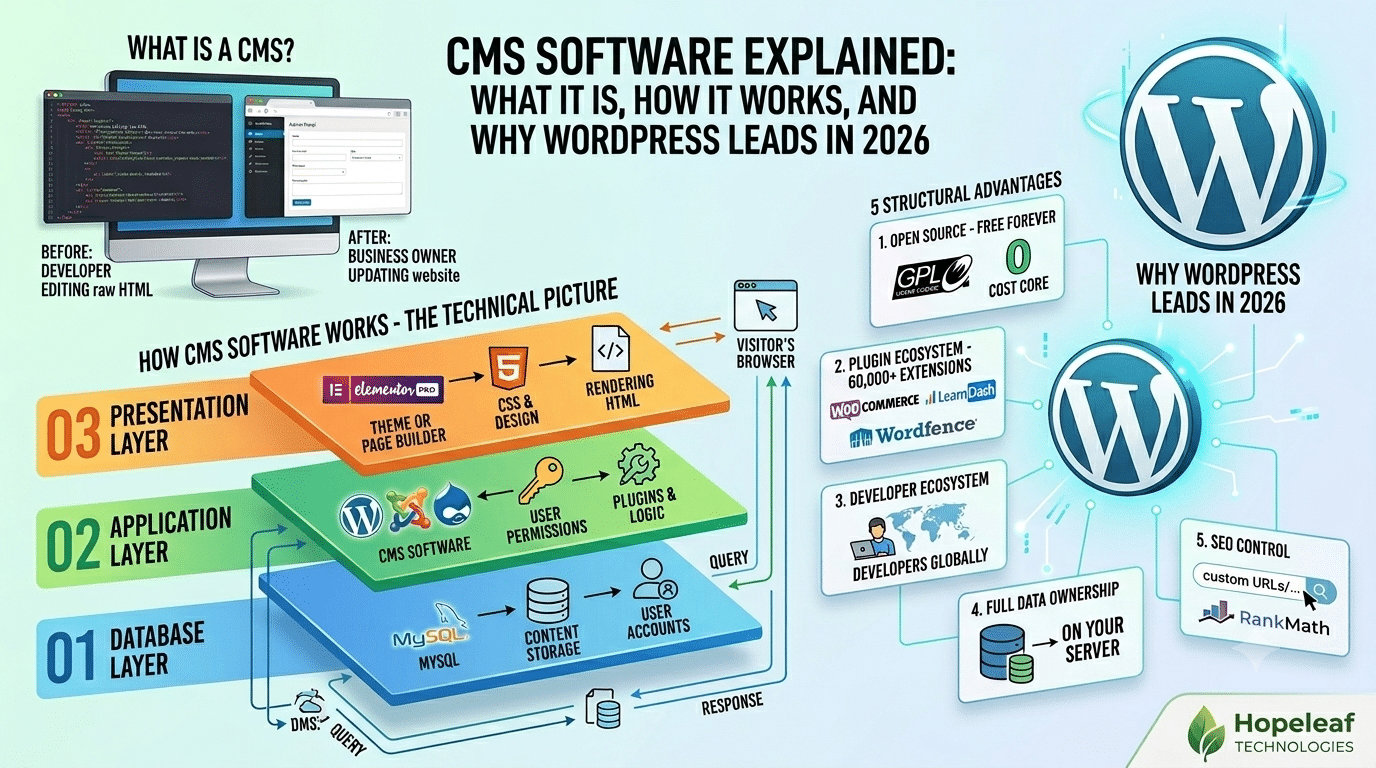
CMS software — Content Management System software — is the technology layer that separates the content of a website (text, images, pages, posts) from the code that displays it. Without CMS software, every website update requires a developer to edit raw HTML files. With CMS software, a non-technical business owner can update their own website through a browser-based interface — no coding knowledge required.
The impact of this is significant. Businesses that once depended entirely on developers for every minor website change can now manage their own content, publish blog posts, update service pages, and add products independently. CMS software is what makes that independence possible.
How CMS Software Works — The Technical Picture
| # | Step | Description |
|---|---|---|
| 01 | Database Layer | Content is stored in a database (typically MySQL). Every page, post, image reference, setting, and user account lives here. When someone visits your site, the CMS queries this database to retrieve the relevant content. |
| 02 | Application Layer | The CMS software itself — WordPress, Joomla, Drupal — sits between the database and the display layer. It processes requests, retrieves content from the database, applies user permissions, and runs plugins and logic. |
| 03 | Presentation Layer | The theme or page builder (Elementor Pro) takes the content from the application layer and renders it visually. CSS controls how everything looks; the resulting HTML is sent to the visitor’s browser. |
What CMS Software Manages
| Content Type | Examples |
|---|---|
| Pages | Home, About, Services, Contact — edited in the admin panel |
| Posts / Articles | Blog posts, news articles, case studies — with categories and tags |
| Media | Images, PDFs, video embeds — managed in the Media Library |
| Users | Admin, editor, author, subscriber — with different permission levels |
| Settings | Site title, tagline, permalink structure, reading settings |
| Products | WooCommerce products, prices, inventory, variations (if e-commerce) |
| Custom Data | Property listings, team members, events — via Custom Post Types |
Why WordPress Has Led CMS Market for Over a Decade
1. Open Source — Free Forever
2. The Plugin Ecosystem — 60,000+ Extensions
3. The Developer Ecosystem
Millions of developers worldwide know WordPress. Finding a WordPress developer in any country is straightforward; finding a Contentful or Sitefinity specialist is not. This competitive developer market keeps costs reasonable and ensures quality options across all price points.
4. Full Data Ownership
Your WordPress content lives in a database on your own hosting server. You can export everything, migrate to any host, or move to a different developer at any time. This contrasts with SaaS CMS platforms (Webflow, Squarespace, Wix) where your content is stored on their servers under their terms of service.
5. SEO Control
WordPress gives more granular SEO control than any other CMS — custom URL structures, meta tags via RankMath, schema markup, Core Web Vitals optimisation, hreflang for international targeting, and XML sitemaps. For businesses that need to rank on Google, this control is a meaningful competitive advantage.
We Build on WordPress — The World's Most Powerful CMS
Hopeleaf Technologies has been building on WordPress for 9+ years. We configure RankMath, Elementor Pro, WooCommerce, and the full stack that makes WordPress perform at its best.
- Start with WordPress → hopeleaftechnologies.com/contact-us/
We Build Every Site in Elementor Pro
Hopeleaf Technologies is a specialist Elementor agency — we design in Figma and build in Elementor Pro on WordPress. Fast, editable, and built to rank on Google.