The data from 2026 is alarming, and it changes the conventional advice about WordPress security in fundamental ways. ‘Keep your Plugin Vulnerabilities updated’ remains true but is no longer sufficient. With a 5-hour exploitation window, you often can’t update fast enough. And with 46% of vulnerabilities having no patch at disclosure, there’s sometimes nothing to update to.
Understanding this threat scene, and the specific steps that actually mitigate it, is now essential for anyone who owns or manages a WordPress site.
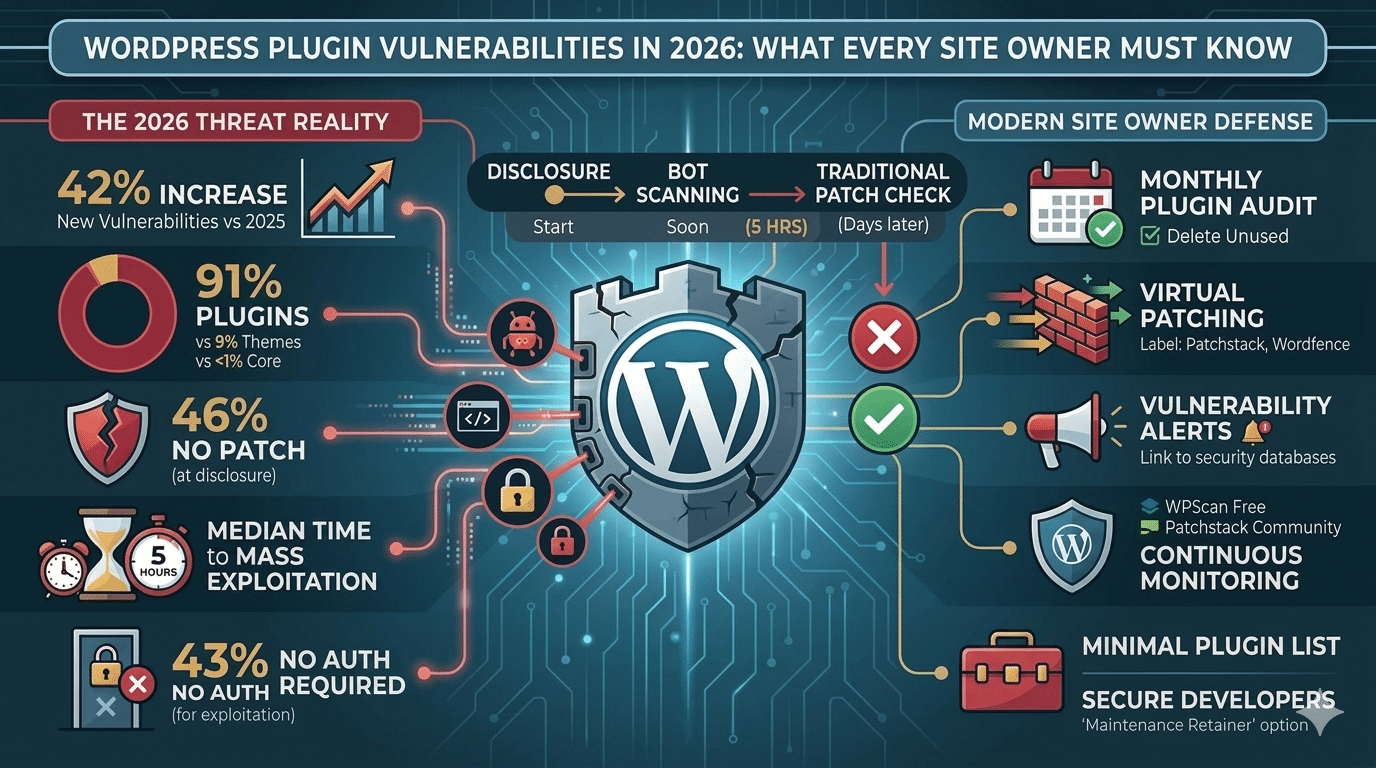
KEY SECURITY STATISTICS — 2026
- 11,334 new WordPress vulnerabilities discovered in 2025 — a 42% increase year-over-year (Patchstack 2026)
- 91% of all WordPress vulnerabilities are in Plugin Vulnerabilities — themes account for 9%, core almost none
- 46% of vulnerabilities have NO patch available when publicly disclosed
- 5 hours — the median time from public disclosure to mass exploitation in the wild
- 43% of exploitable vulnerabilities require no authentication whatsoever
- 333 new vulnerabilities were disclosed in a single week in January 2026
- 52% of plugin developers do not patch before public disclosure
Why Plugin Vulnerabilities Are the #1 Attack Vector
WordPress core itself is extremely well-maintained. In 2025, only six low-priority issues were reported in WordPress core, a testament to the quality of the core development team. The risk isn’t WordPress itself; it’s the third-party ecosystem layered on top of it.
The average WordPress site runs 18–22 Plugin Vulnerabilities. Each Plugin Vulnerabilities is a separate codebase, maintained by a separate developer (or team, or solo hobbyist), with wildly varying security practices. Here’s what I found: some plugins are maintained by large companies with full security teams; others are maintained by one person in their spare time.
Plugin Vulnerabilities account for 91% of all WordPress Plugin Vulnerabilities because there are simply thousands more plugins than there are core files, with far fewer quality controls on their code.
The Most Dangerous Vulnerability Types in 2026
| Vulnerability Type | What It Means | Requires Login? | Frequency |
|---|---|---|---|
| Cross-Site Scripting (XSS) | Attacker injects malicious scripts into your pages | Sometimes No | Most common |
| SQL Injection | Attacker reads/modifies your database | Sometimes No | High |
| Broken Access Control | Users access features beyond their permission level | Often Yes | High |
| Remote Code Execution (RCE) | Attacker runs arbitrary code on your server | Sometimes No | Critical |
| File Upload | Attacker uploads malicious PHP files via your site | Sometimes No | High |
| CSRF | Attacker tricks logged-in admin into taking harmful actions | Yes (admin) | Moderate |
| Authentication Bypass | Attacker skips login entirely | No | Critical |
What '5 Hours to Exploitation' Actually Means for You
Patchstack’s 2026 whitepaper reports that the weighted median time from a vulnerability being publicly disclosed to mass exploitation in the wild is 5 hours. You know what? This fundamentally changes how you need to think about Plugin Vulnerabilities updates.
Traditional security advice: check for Plugin Vulnerabilitiesupdates once a week or when you log in. In 2026 threat reality: a vulnerability is publicly disclosed on Monday morning. By Monday afternoon, automated bots have already scanned millions of WordPress sites and exploited every one running the vulnerable version. You checked for updates on Sunday.
This is why virtual patching (Patchstack’s approach) is increasingly important, it deploys a firewall rule that blocks exploitation of a vulnerability within hours of disclosure, regardless of whether a patch exists from the developer.
How to Check if Your WordPress Plugin Vulnerabilities Are Vulnerable — Right Now
Method 1 — WPScan (Free)
WPScan is a black-box vulnerability scanner specifically built for WordPress. The free API tier allows 25 scans per day. Run it against your site to see a list of your installed plugins and any known vulnerabilities in their current versions.
					# Command line:

    wpscan --url https://yourdomain.com --api-token YOUR_API_TOKEN

    # Or use the online scan at: wpscan.com/wordpress-security-scanner
Method 2 — Patchstack App (Free Community Tier)
Sign up at patchstack.com, connect your WordPress site, and Patchstack continuously monitors your installed Plugin Vulnerabilities against its vulnerability database. You receive email alerts when a new plugin vulnerability is discovered in any plugin you have installed, often before the plugin developer has even issued a patch.
Method 3 — Wordfence Scan
In your WordPress admin, go to Wordfence > Scan. Run a full scan. Wordfence checks your installed plugin versions against known vulnerable versions in its database and reports any matches under ‘Plugin Security Issues’ in the scan results.
The Plugin Audit Checklist — Do This Monthly
- List every installed plugin (including inactive ones) — go to Plugins > Installed Plugins
- Check last updated date for each plugin — if a plugin hasn’t been updated in 12+ months, investigate whether it’s been abandoned
- Delete every plugin you’re not actively using — inactive plugins are still attack vectors
- Check each plugin against Patchstack’s database (patchstack.com/database) for known vulnerabilities
- Run a Wordfence scan to check for modified plugin files
- Verify the plugin’s WordPress.org listing still shows active maintenance and recent reviews
- For high-traffic or business-critical sites: subscribe to Patchstack for automated monitoring
Premium vs Free Plugins — A Security Note
Many people assume premium plugins (those bought from ThemeForest, CodeCanyon, or developer websites) are more secure than free WordPress.org plugins. The 2025 data tells a different story: nearly 2,000 valid vulnerability reports were filed against premium marketplace components in 2025. Premium price does not correlate with security quality.
Premium plugins sold outside WordPress.org are also not automatically included in WordPress’s update notification system. You must manually update them by downloading new versions from the marketplace and uploading them, a process many site owners neglect.
- Nulled (pirated) premium plugins are the single most dangerous thing you can install on a WordPress site. They routinely contain pre-installed backdoors and malware. No cost saving justifies the security exposure.
We Audit Plugin Security on Every WordPress Site We Build and Maintain
Hopeleaf Technologies keeps plugin lists minimal and updated on all client sites. Our maintenance retainers include monthly plugin audits, vulnerability monitoring via Patchstack, and updates applied to staging before live.
- Ask about WordPress maintenance → hopeleaftechnologies.com/contact-us/
We Build Every Site in Elementor Pro
Hopeleaf Technologies is a specialist Elementor agency — we design in Figma and build in Elementor Pro on WordPress. Fast, editable, and built to rank on Google.