With hundreds of CMS platforms available in 2026, choosing the right one for your business website is a genuine decision. The wrong choice means paying for features you don’t use, being locked into a platform that limits your growth, or spending months rebuilding a site you outgrew.
This guide compares 10 real CMS software examples — covering what each one does, who it’s for, how much it costs, and when to choose it over the alternatives.
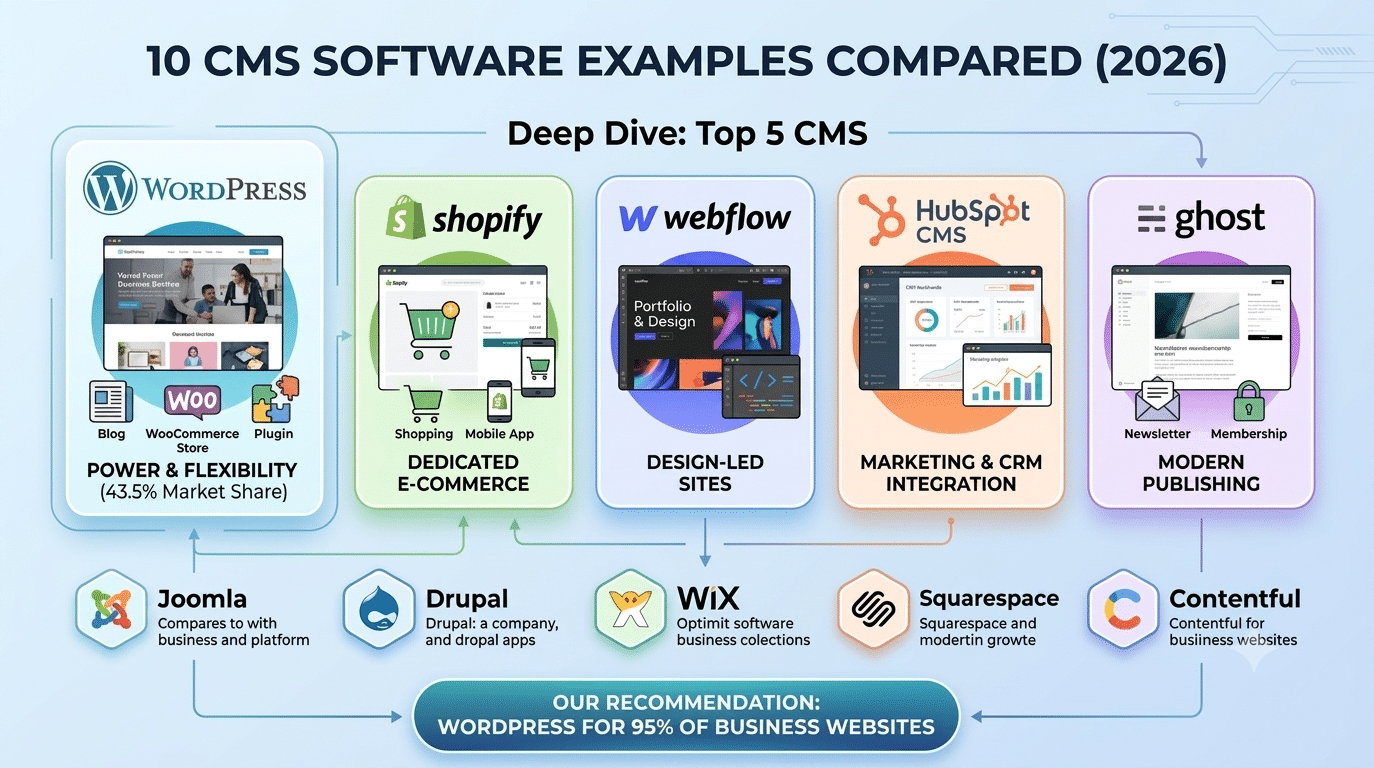
CMS Software Examples — Quick Reference Table
| CMS | Type | Market Share | Price | Best For |
|---|---|---|---|---|
| WordPress | Open-source | 43.5% | Free + hosting | Business sites, WooCommerce, blogs, portfolios |
| Shopify | SaaS | ~4% | $29–$299/mo | Dedicated e-commerce stores |
| Webflow | SaaS | ~1% | $14–$212/mo | Design-led brochure & portfolio sites |
| Wix | SaaS | ~3.5% | $17–$159/mo | Small businesses and personal sites |
| Squarespace | SaaS | ~2.5% | $16–$65/mo | Creatives and small service businesses |
| Joomla | Open-source | ~1.9% | Free + hosting | Community portals and intranets |
| Drupal | Open-source | ~1.1% | Free + hosting | Government and enterprise sites |
| HubSpot CMS | SaaS | ~0.8% | $23–$1,200/mo | Marketing teams with CRM integration |
| Ghost | Open-source | ~0.5% | Free or $9+/mo | Newsletter and membership publishing |
| Contentful | Headless | Enterprise | $300+/mo | Multi-channel enterprise content |
Deep Dive: The Top 5 CMS Software Examples
1. WordPress — The World's Most Used CMS
WordPress is open-source software you install on your own hosting. The core software is free; you pay only for hosting (from ₹500/month), a page builder like Elementor Pro ($59/year), and any premium plugins you need. WordPress is the right choice for the overwhelming majority of business websites in 2026 — from 3-page brochure sites to 10,000-product WooCommerce stores.
- Pros: Complete flexibility, 60,000+ plugins, full data ownership, best SEO control, lowest long-term cost
- Cons: Requires updates and maintenance, slightly steeper initial learning curve
- Best for: Any business website that isn’t a simple personal page
2. Shopify — Best Dedicated E-Commerce Platform
Shopify is a hosted SaaS platform designed exclusively for e-commerce. Setup is faster than WooCommerce, but the ongoing cost is significantly higher and transaction fees apply unless you use Shopify Payments (unavailable in India). WooCommerce is typically the better choice for Indian businesses.
- Pros: Fast setup, excellent mobile app, 24/7 support included
- Cons: Transaction fees in India (Shopify Payments not available), high monthly cost, limited CMS flexibility
- Best for: International e-commerce brands prioritising speed over cost
3. Webflow — Best for Design-Led Sites
Webflow is a hosted platform with excellent visual design tools. It produces clean code and handles hosting. But it’s expensive at scale, lacks WordPress’s e-commerce capabilities, and the content editing interface is more complex than WordPress for non-technical users.
- Pros: Excellent design freedom, clean code output, hosting included
- Cons: High cost, complex CMS, no equivalent to WooCommerce, data locked into Webflow
- Best for: Agencies building visually ambitious brochure sites for design-conscious clients
4. HubSpot CMS — Best for Marketing Teams
HubSpot CMS integrates your website with HubSpot’s CRM, email marketing, and lead management tools. If your business already uses HubSpot and needs tight CRM integration, HubSpot CMS makes sense. For anyone else, the $300+/month cost is difficult to justify.
- Pros: Native CRM integration, personalisation, built-in analytics
- Cons: Very expensive, vendor lock-in, limited design flexibility
- Best for: HubSpot-based sales and marketing teams
5. Ghost — Best for Content Publishers
Ghost is a minimal, fast, open-source publishing platform focused entirely on content — blog posts, newsletters, and membership subscriptions. It has no page builder, no e-commerce, and no plugin ecosystem. What it does have is exceptional performance and a clean writing experience.
- Pros: Extremely fast, beautiful default typography, built-in newsletter/membership
- Cons: No page builder, no plugins, very limited for anything beyond publishing
- Best for: Newsletters, blogs, and media publications that publish content exclusively
Our Recommendation: WordPress for 95% of Business Websites
After building 150+ websites across multiple CMS platforms, our recommendation at Hopeleaf Technologies is consistent: WordPress is the right choice for the vast majority of small and medium business websites. The flexibility, ownership, SEO control, and cost-effectiveness over a 3–5 year horizon outperform every alternative we’ve tested.
- Exception: if you are a solo creative needing a simple 3-page portfolio with no update requirements — Squarespace or Webflow may genuinely be simpler for your specific situation.
We Build WordPress CMS Sites for Businesses Across 4 Continents
Hopeleaf Technologies has delivered 150+ WordPress websites for businesses in India, Australia, Belgium, and the USA. Fixed price. Full data ownership. Built to last.
- Get a free WordPress quote → hopeleaftechnologies.com/contact-us/
We Build Every Site in Elementor Pro
Hopeleaf Technologies is a specialist Elementor agency — we design in Figma and build in Elementor Pro on WordPress. Fast, editable, and built to rank on Google.