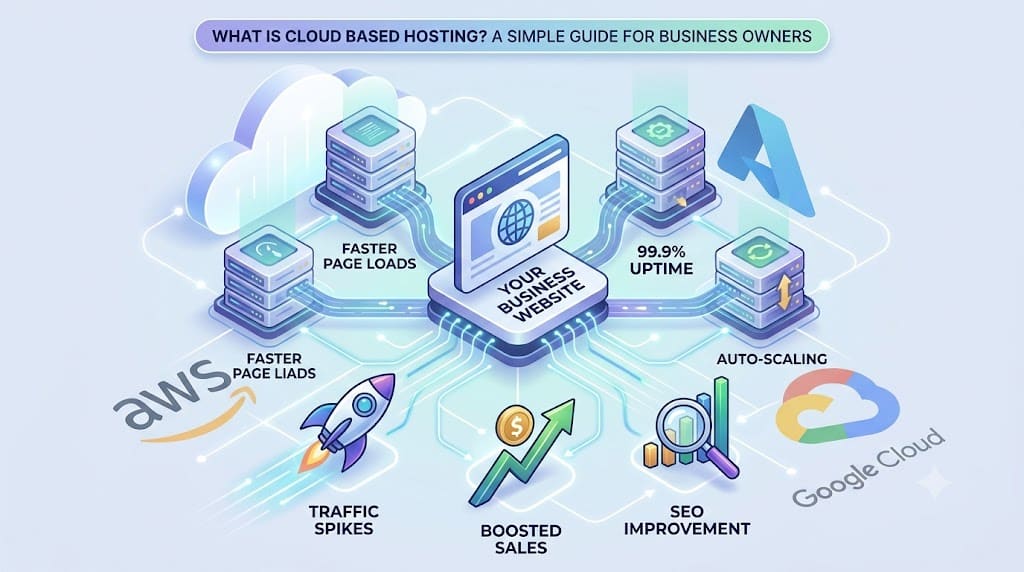
Cloud based hosting stores your website across a network of connected virtual servers instead of a single physical machine, so if one server fails or gets overloaded, another takes over instantly. For business owners, that means faster page loads, fewer crashes during traffic spikes, and better Google rankings — without paying for a full dedicated server.
Here’s what you need to know upfront:
- Entry pricing: Managed cloud plans start around $8.47/month for small business workloads.
- Market signal: The global cloud computing market was valued at $943.7B in 2025 and is projected to reach $3.34T by 2033 at a 16% CAGR.
- Uptime: Major providers guarantee 99.95%–99.99% uptime, far higher than typical shared hosting.
- Savings: Mid-sized businesses save 30%–50% annually by offloading server maintenance to a cloud provider.
Most business owners discover hosting only when their site slows down, crashes during a campaign, or starts losing rankings. This guide explains what is cloud based hosting in plain English, shows why it matters for WordPress and WooCommerce sites, and gives an honest view of costs and migration — so by the end, you’ll know whether it suits your business and how to switch without hiring a full-time developer. If you want help along the way, Hopeleaf Technologies specializes in WordPress migrations and post-launch SEO tuning.
What Cloud Based Hosting Actually Is
Cloud hosting spreads your website’s files and databases across a network of connected virtual servers running on top of physical hardware. If one server gets overloaded or fails, another instantly takes its place — your visitors never see a downtime page.
Think of it this way: traditional hosting is like renting one apartment. If the building has plumbing issues, you’re stuck. Cloud hosting is like having access to an entire building of identical apartments — if one has a problem, you simply move next door, and the move happens automatically.
The technology that makes this possible is called virtualization. Providers create a virtual layer on top of physical servers and replicate that layer across multiple data centers and regions. That’s what gives cloud hosting both its redundancy (multiple copies of your site) and its speed (delivery from the server closest to your visitor).
How It Differs From Shared, VPS, and Dedicated Hosting
Most business owners have used shared hosting at some point — it’s cheap, but it bundles hundreds of sites onto one server. When one site gets a traffic spike, every other site on the box slows down. Here’s how the four main types compare:
| Hosting Type | Server Setup | Typical Use Case | Scalability | Starting Cost |
|---|---|---|---|---|
| Shared | Many sites on one server | Hobby blogs, tiny brochure sites | Very limited | $3–$10/mo |
| VPS | Partitioned slice of one server | Growing sites needing more control | Moderate (single-server cap) | $20–$60/mo |
| Dedicated | One full physical server | Large enterprises with strict needs | Rigid, manual scaling | $100–$500+/mo |
| Cloud | Pooled resources across many servers | WooCommerce, lead-gen, multi-region sites | On-demand auto-scaling | $8–$80/mo |
The biggest practical difference: with cloud, you pay for what you use and the system scales up automatically when traffic spikes — instead of crashing.
Common Examples Business Owners Already Use
You’re already using cloud infrastructure every day, probably without realizing it. Google Workspace, Shopify, Dropbox, Slack, and Zoom all run on it. The SaaS market alone was about $197B in 2023 and projected at $247B in 2024 — and nearly every one of those tools sits on top of a cloud host.
Underneath, three providers dominate global cloud infrastructure market share: Amazon Web Services (AWS), Microsoft Azure, and Google Cloud. When you buy “managed cloud hosting” from a provider like Cloudways, Kinsta, or WP Engine, you’re usually renting infrastructure on one of these three under the hood.
Once the concept makes sense, the next question is what cloud hosting actually does for your website’s performance.
Why Cloud Based Hosting Matters for Speed, SEO, and Uptime
Hosting isn’t just plumbing. It directly affects three things every business owner cares about: how fast your site loads, whether it stays online when you need it most, and how Google ranks you. Let’s break each one down.
Speed and Core Web Vitals
Cloud hosting delivers content from servers geographically closer to your visitors. If your audience is in Mumbai, Sydney, and Frankfurt, your site can serve each visitor from a nearby data center — instead of forcing everyone to wait while data crosses oceans.
This directly improves two Core Web Vitals Google uses for ranking: Largest Contentful Paint (LCP) and Time to First Byte (TTFB). For WordPress and WooCommerce sites specifically, a faster server response also reduces plugin and database query lag — which is often the real reason Elementor-built pages or WooCommerce checkout flows feel sluggish on cheap hosts. If you’ve been blaming Elementor for slow loads, the host is usually the bigger culprit. Our team covers this often in WordPress performance audits.
Uptime and Traffic Spikes
Downtime quietly destroys revenue. Every minute your site is down during a sale or ad campaign is money you’ll never see again. Here’s what the major providers guarantee:
- AWS guarantees 99.99% uptime for EC2 and S3, and Azure offers 99.95% for VMs and 99.99% for storage[6].
Compare that to typical shared hosting, which rarely commits to anything beyond 99.9% and often delivers less in practice. Cloud hosting also handles traffic spikes — from sales, ad campaigns, or press mentions — by automatically scaling resources up. Shared hosting tends to slow down or crash under the same load.
One honest caveat: even big providers had notable outages in 2025. Cloud isn’t magic. You still need automatic backups and a disaster recovery plan — we’ll cover that in the migration checklist below.
SEO and Reliability
Google’s job is to send users to pages that load fast and stay online. Repeated downtime, slow pages, or 5xx errors during crawls signal poor user experience — and rankings drop accordingly. Cloud hosting’s automatic failover (when one server fails, another fills in seamlessly) protects your rankings during hardware issues that would knock a single-server site offline.
For service businesses and ecommerce stores running paid ads, this matters even more: every dollar you spend driving traffic is wasted if the landing page is down or crawling. Now that the performance case is clear, let’s talk about what it actually costs. The Hopeleaf SEO team regularly sees ranking recoveries simply from moving clients off overloaded shared servers.
What Cloud Hosting Really Costs a Small Business
Most guides dance around pricing. Here are the real numbers you can plan a budget against.
Monthly Pricing Tiers
Cloud hosting costs scale with how much traffic, storage, and managed support you need. Entry-level managed cloud plans start around $8.47 per month for small business workloads. From there, pricing typically looks like this:
| Plan Tier | Typical Monthly Cost | Best For | What’s Included |
|---|---|---|---|
| Entry / Starter | $8–$25 | Brochure sites, small lead-gen sites | 1 site, basic caching, daily backups |
| Business | $25–$80 | WooCommerce stores, growing service sites | Higher RAM/CPU, staging, free SSL, CDN |
| High-traffic / Multi-site | $150–$400+ | Stores with heavy traffic, agencies, multi-region | Dedicated resources, priority support, advanced caching |
Note that “managed” pricing is higher than raw cloud (AWS or DigitalOcean droplets) because the provider handles updates, security patching, server tuning, and support — work that would otherwise cost more in developer hours.
Migration and One-Time Costs
Moving an existing WordPress site to cloud hosting usually has a one-time cost. Professional data migration typically runs $1,000 to $5,000 depending on site complexity, database size, plugin count, and email/DNS setup.
Good news: many managed cloud providers now include free migration for standard WordPress sites (one site, no custom code, normal plugin stack). If your site is more complex — large WooCommerce catalogs, custom post types, multi-currency, or membership functionality — paid migration through a specialist is usually safer than risking checkout breakage.
Long-Term Savings
The monthly fee is only one side of the equation. The bigger savings come from what you stop paying for:
- A 2025 IDC report cited by industry analysts found mid-sized businesses save 30%–50% annually by offloading server maintenance and patching to a cloud provider[9].
DigitalOcean’s Currents survey reinforces this: 47% of companies report cost savings and 67% report efficiency gains from technology investments including cloud. And the cloud migration market itself is growing from $232.51B in 2024 to a projected $806.41B by 2029 at a 28.24% CAGR — businesses are clearly voting with their budgets.
For a typical small business, this often means trading $200/year in cheap shared hosting (plus hours of downtime headaches) for ~$400–$600/year in managed cloud — and getting back time, ranking stability, and lost-sale prevention worth far more.
Pros, Cons, and Who Should (and Shouldn't) Switch
An honest evaluation matters more than a sales pitch. Here’s a clear-eyed view so you can self-qualify before spending anything.
Pros and Cons at a Glance
| Advantage | What It Means for You | Trade-off / Risk |
|---|---|---|
| Auto-scaling | Handles ad campaigns and viral traffic without crashing | Variable bills if traffic spikes unexpectedly |
| Pay-as-you-go pricing | Pay only for resources used | Harder to forecast monthly cost vs. flat shared hosting |
| Geographic redundancy | Faster loads worldwide; survives a single data center failure | Major providers still had outages in 2025[7] |
| Stronger security defaults | Patched OS, DDoS protection, firewall built in | Misconfiguration on unmanaged plans still risky |
| Automatic backups | Daily snapshots; easy rollback | You still need an off-site copy |
| Managed updates | Less dependency on a developer | Steeper learning curve on unmanaged plans |
Data residency is another quiet consideration. If you serve EU customers (GDPR), Indian users (data protection rules), or Middle East clients, pick a provider that lets you choose the data center region — most major managed clouds do.
Good Fits vs. Poor Fits
Strong fit for cloud hosting:
- WooCommerce stores where checkout downtime directly costs sales.
- Lead-generation sites running paid ads (Google, Meta, LinkedIn).
- Businesses serving multiple regions or international audiences.
- Sites that have outgrown shared hosting — slow admin, frequent timeouts, plugin conflicts.
- Anyone whose site is genuinely tied to revenue or pipeline.
Not critical (yet) for:
- Brochure sites with under 5,000 monthly visits and no transactions.
- Sites where premium managed WordPress hosting (not cloud-branded) already delivers acceptable speed.
- Pre-launch projects where you’re still validating the business idea.
If you fall into the “strong fit” group, the next question is practical: how do you actually move?
How to Move Your WordPress Site to Cloud Hosting
Migration sounds scary, but it’s mostly checklist work. The biggest decisions happen before you touch a single file.
Choose Managed vs. Unmanaged
This is the most important fork in the road:
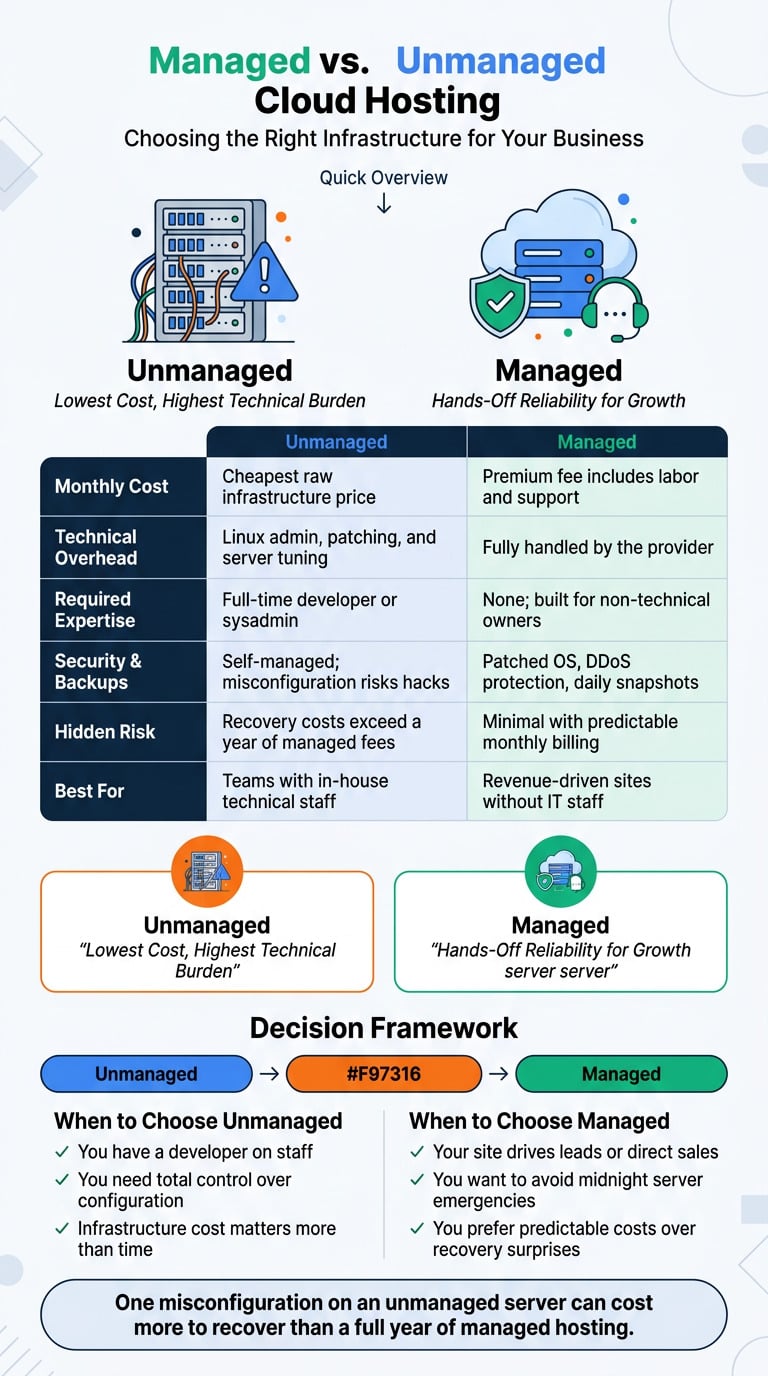
- Unmanaged cloud (raw AWS, Azure, Google Cloud, DigitalOcean droplets): cheapest monthly cost, but you handle Linux administration, security patches, caching, and server tuning. Only sensible if you have a developer on staff.
- Managed cloud (Cloudways, Kinsta, WP Engine running on GCP/AWS): higher monthly fee, but the provider covers updates, caching, backups, SSL, and support. This is almost always the right call for non-technical business owners.
The hidden cost of unmanaged hosting is your time. A single misconfigured firewall rule or skipped security update can mean a hacked site — and recovery costs more than a year of managed fees.
Step-by-Step Migration Checklist
Use this sequence for any WordPress or WooCommerce migration:
- Audit your current site. List your theme, plugins, page builder (Elementor), database size, current uptime, and PageSpeed scores. This is your baseline — you’ll measure post-migration performance against it.
- Pick a data center close to your main audience. Mumbai or Singapore for India, Sydney for Australia, Frankfurt or London for EU, North Virginia for US East Coast.
- Back up files and the database before doing anything else. Keep two copies — one with your provider, one downloaded locally or to cloud storage.
- Use a migration plugin or the provider’s tool. Most managed clouds offer one-click migration. For complex sites, manual SFTP + database import is more reliable.
- Test thoroughly on a staging URL. Check contact forms, WooCommerce checkout, payment gateways, SSL certificates, email deliverability, and every Elementor template. Don’t skip mobile.
- Update DNS and monitor for 48 hours. Lower your DNS TTL beforehand so the cutover is fast. Watch error logs and uptime monitors closely.
- Configure automatic daily backups and document a clear disaster recovery process. Even cloud providers fail occasionally — your own backup strategy is non-negotiable.
When to Get Professional Help
DIY migration works for simple sites. Hire a WordPress specialist if any of these apply:
- Custom code in the theme or functions.php you didn’t write yourself.
- Large WooCommerce catalogs (1,000+ products) or multi-currency setups.
- Membership sites, LMS plugins, or booking systems with live user data.
- Strict downtime tolerance — sites where even 30 minutes offline costs real money.
- Active SEO traffic you can’t afford to risk with redirect or canonical errors.
The $1,000–$5,000 migration range typically covers this professional work — a worthwhile insurance policy when the alternative is a broken checkout on launch day. If you’d rather not navigate this alone, the team at Hopeleaf Technologies handles WordPress and WooCommerce migrations end to end, including post-launch SEO tuning.
Key Takeaways
Cloud based hosting spreads your website across multiple servers, giving better speed, higher uptime, and the ability to handle traffic spikes without crashing. It’s no longer exotic infrastructure — it’s the default choice, with the market growing from $943.7B in 2025 toward $3.34T by 2033.
The numbers worth remembering:
- Entry cost is accessible: roughly $8.47/month at the low end, scaling with traffic.
- Migration is a one-time spend: $1,000–$5,000 for professional help on complex sites
- Long-term savings are real: 30%–50% annual savings on server maintenance for mid-sized businesses.
- SEO and conversions improve: faster Core Web Vitals, fewer downtime hits to rankings, more stable checkout flows.
The decision is simple: if your site drives revenue or leads, cloud hosting is almost always worth the switch — ideally on a managed plan so you’re not stuck doing Linux admin at midnight. If you want a second opinion on whether to migrate, which host fits your traffic, or how to move cleanly without breaking SEO, the team at Hopeleaf Technologies can help you scope it out and handle the heavy lifting.
FAQs
What is cloud hosting in simple terms?
Cloud hosting is a way of running your website on a network of connected virtual servers instead of one physical machine. If one server fails or gets busy, another instantly takes over so your site stays online and fast. Think of it as having backup servers always ready, with you only paying for what you actually use.
Is cloud hosting good for small businesses and WordPress sites?
Yes, especially if your site generates leads or sales. Cloud hosting delivers faster page loads, better Core Web Vitals scores, and far higher uptime than shared hosting — all of which help Google rankings and conversions. For WordPress and WooCommerce specifically, managed cloud plans handle plugin conflicts, caching, and checkout stability much better than budget shared hosts.
How much does cloud hosting cost per month for a small business?
Entry-level managed cloud plans start around $8.47 per month for small business workloads. Mid-range business plans typically run $25–$80 per month, while high-traffic WooCommerce stores can reach $150+ monthly. One-time migration costs add $1,000–$5,000 for complex sites, though many providers offer free migration for standard WordPress installs.
What is the difference between regular web hosting and cloud hosting?
Regular (shared) hosting puts your site on one physical server alongside many other sites — when one site spikes, everyone slows down. Cloud hosting spreads your site across multiple servers and scales resources up automatically during traffic surges. The result is better speed, higher uptime, and the ability to handle ad campaigns or sales without crashing.
What are the main disadvantages of cloud based hosting?
Monthly bills can vary if traffic suddenly spikes, since you pay for resources used. Unmanaged plans (raw AWS or Azure) have a steep learning curve and require server administration skills. Even major providers had outages in 2025, so independent backups remain essential. Data residency rules in regions like the EU or India may also limit which data centers you can use.
We Build Every Site in Elementor Pro
Hopeleaf Technologies is a specialist Elementor agency — we design in Figma and build in Elementor Pro on WordPress. Fast, editable, and built to rank on Google.