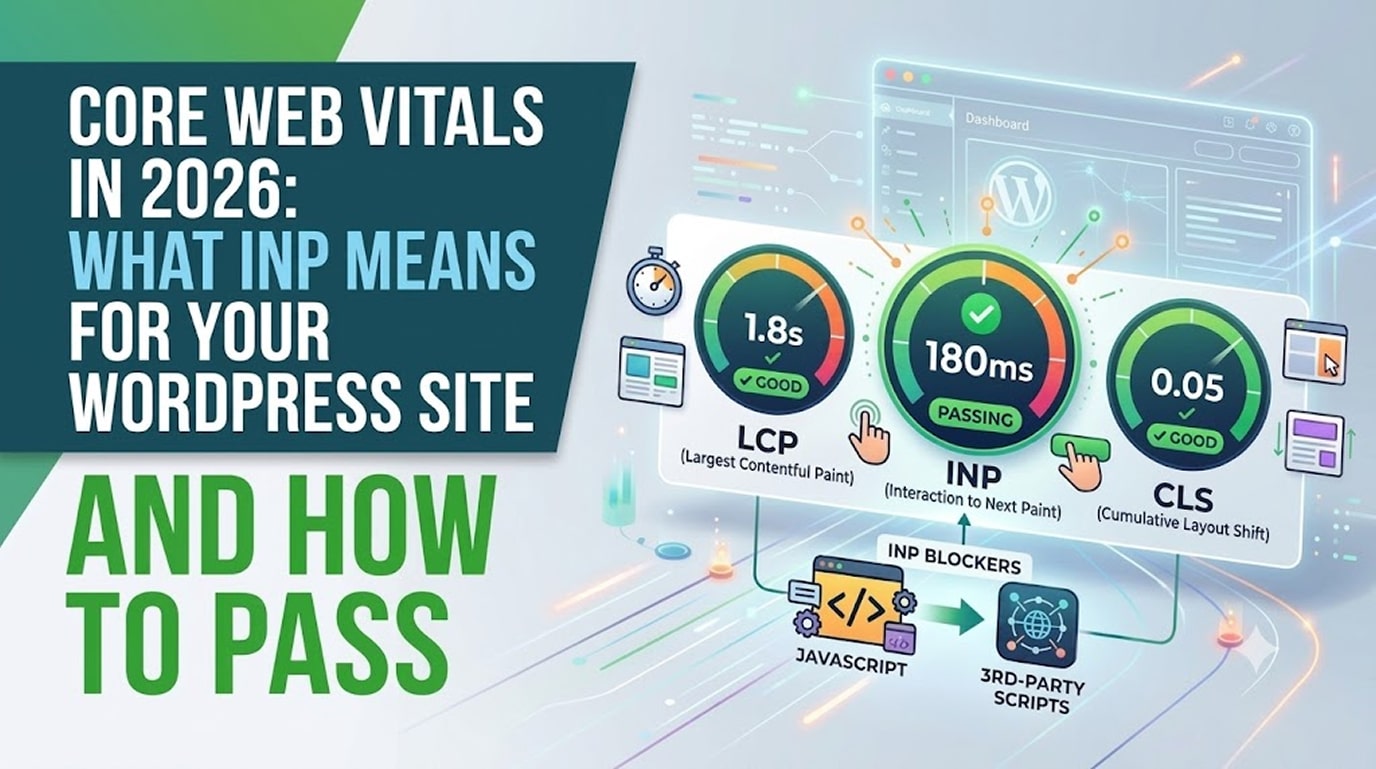
Google’s Core Web Vitals measure how real visitors experience your website — and they influence both your rankings and your conversion rate. In 2026, the metric most WordPress sites fail isn’t loading speed. It’s INP: Interaction to Next Paint, the measure of how quickly your site responds when someone clicks, taps, or types.
Here’s what each Core Web Vital means, why INP trips up so many WordPress and Elementor sites, and the practical fixes that get you into the green.
The Three Core Web Vitals, Explained Simply
LCP (Largest Contentful Paint) — how fast the main content appears. Target: under 2.5 seconds. Think of it as “how long until the visitor sees the page.”
INP (Interaction to Next Paint) — how fast the page responds to a click or tap. Target: under 200 milliseconds. This is “how long until the site reacts when I do something.”
CLS (Cumulative Layout Shift) — how much the page jumps around while loading. Target: under 0.1. Nobody enjoys tapping a button that moves at the last second.
You can check your scores free at PageSpeed Insights — the “field data” section shows what real Chrome users experienced on your site over the past 28 days.
Why INP Is the One WordPress Sites Fail
INP replaced the older FID metric because FID was too easy to pass. According to Google’s official INP documentation, INP measures every interaction across the whole visit, not just the first one — so a site that loads fast but stutters when you open the mobile menu now fails.
WordPress sites struggle with INP for predictable reasons:
- JavaScript overload. Every plugin adds scripts. Chat widgets, sliders, pop-ups, analytics, and page-builder libraries all compete for the browser’s attention, delaying responses to user input.
- Heavy third-party embeds. Facebook pixels, YouTube embeds, and booking widgets run code you don’t control.
- Long tasks on the main thread. When one script hogs the browser for 300ms, every click during that window feels laggy.
- Cheap shared hosting. A slow server delays everything downstream.
How to Fix INP on a WordPress + Elementor Site
1. Audit and remove plugin bloat
Every active plugin should justify its existence. We regularly cut sites from 35 plugins to under 20 with zero lost functionality — and INP improves immediately. (See our guide to the best WordPress plugins for small business for a lean, high-quality stack.)
2. Delay non-critical JavaScript
Performance plugins like WP Rocket or Perfmatters can delay scripts (chat widgets, pixels, pop-ups) until the visitor actually interacts. This is usually the single biggest INP win — often cutting response times by half or more.
3. Serve fewer, lighter scripts on mobile
Mobile CPUs are where INP fails hardest. Disable desktop-only widgets on mobile in Elementor’s responsive settings, and lazy-load anything below the fold.
4. Use decent hosting with server-level caching
Managed WordPress hosting with server caching and PHP 8.3+ shortens every response. If your host still runs old PHP, you’re leaving free performance on the table.
5. Keep Elementor lean
Elementor is perfectly capable of green Core Web Vitals — our client sites prove it — but it rewards discipline: use Elementor’s built-in features instead of stacking add-on packs, enable its performance experiments (reduced DOM output, optimized asset loading), and avoid nesting sections ten layers deep.
6. Fix LCP and CLS while you're there
Compress and convert images to WebP, set explicit dimensions on images and ads (kills CLS), preload the hero image and fonts (boosts LCP), and use a CDN like Cloudflare.
What "Good" Looks Like
A well-built WordPress business site in 2026 should achieve: LCP under 2 seconds, INP under 200ms, CLS near zero, and a mobile PageSpeed score of 85+. Every site we launch is tuned to these targets before handover — speed is a build decision, not an afterthought. Our WordPress maintenance and performance services keep sites in the green long after launch, too.
Frequently Asked Questions
Do Core Web Vitals really affect rankings?
Yes — they’re a confirmed ranking signal. The bigger effect is often indirect: fast, responsive sites convert dramatically better, and lower bounce rates reinforce rankings.
My PageSpeed score is 95 but INP is red. How?
Lab scores simulate a single page load; INP comes from real users interacting across full visits. Focus on the field data, not the lab score.
Is Elementor bad for Core Web Vitals?
No — poorly configured Elementor is. With performance settings enabled, lean plugins, and good hosting, Elementor sites pass all three vitals comfortably.
How long do fixes take to show in Google's data?
Field data covers a rolling 28-day window, so expect 3–4 weeks after fixes before your scores fully update.
Failing Core Web Vitals?
We’ll tell you exactly why, and fix it.
- Ask about WordPress hosting → hopeleaftechnologies.com/contact-us/
We Build Every Site in Elementor Pro
Hopeleaf Technologies is a specialist Elementor agency — we design in Figma and build in Elementor Pro on WordPress. Fast, editable, and built to rank on Google.