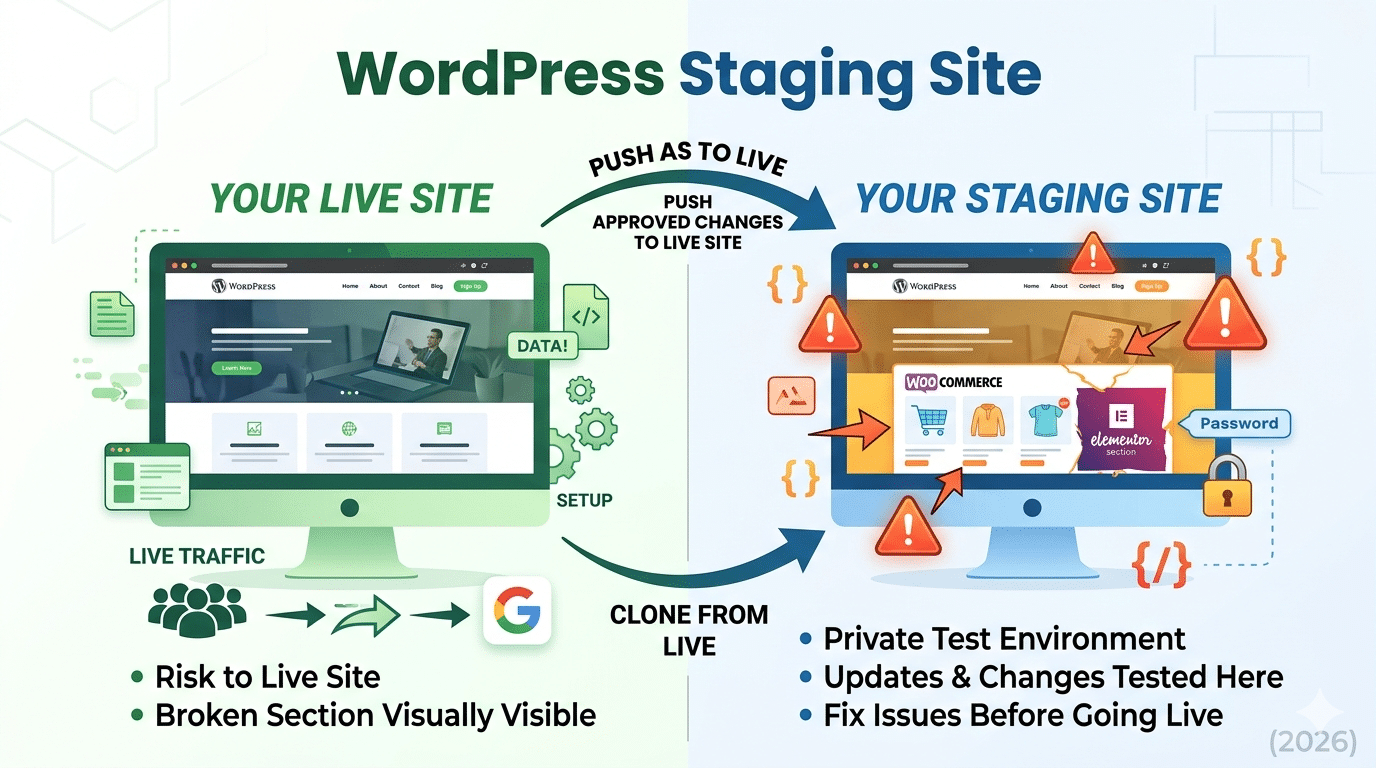
A staging site is a private copy of your live WordPress website, an identical clone where you can test changes, updates, and new features without any risk to your live site or its visitors. When something breaks on staging, you fix it there. Nothing reaches your live site until it’s been tested and approved.
Every professional WordPress site should have a staging environment. Every agency that doesn’t use staging is taking unnecessary risks with client websites. Here’s why it matters and exactly how to set one up.
Why Staging Is Non-Negotiable for WordPress
1. Plugin Updates Can Break Elementor Layouts
WordPress plugin updates are the leading cause of broken sites. An Elementor update, combined with a WooCommerce update, combined with a WP Rocket update, can interact in unexpected ways. On a staging site, you run all three updates first. If an Elementor section breaks, which happens, you fix it privately before it goes anywhere near your live site.
2. New Features Should Be Tested Before Going Live
You want to add a new service page, a booking system, or a new Elementor pop-up. Build it on staging. Get client approval on staging. Only push to live when everything is right. Designing directly on a live site means your half-finished work is visible to every visitor and Google crawler.
3. WordPress Core Updates Can Conflict with Your Theme
Major WordPress version updates (6.x to 7.x, etc.) occasionally break theme or plugin compatibility. Test on staging first, identify any conflicts, update the conflicting plugins, then apply the core update to live.
3 Ways to Create a WordPress Staging Site
Method 1 — Your Hosting Provider's Built-In Staging (Best)
Most managed WordPress hosts offer one-click staging: SiteGround (Tools > Staging), Kinsta (Sites > Staging), WP Engine (Sites > Add Staging), and Cloudways (Application > Clone). This creates an exact clone of your live site on a separate subdomain (e.g., staging.yourdomain.com) with one click. Push changes from staging to live with another click.
Method 2 — WP Staging Plugin (Best for Shared Hosting)
Install the free WP Staging plugin. Go to WP Staging > Start Staging Site. The plugin clones your WordPress files and database to a subfolder (e.g., yourdomain.com/staging). It creates a private, password-protected staging area accessible only to admins. The Pro version adds push-to-live functionality.
Method 3 — Duplicator Pro
Duplicator Pro lets you clone your WordPress site and push it to a separate subdomain or server. More flexible than WP Staging for complex setups, but requires more technical knowledge to configure. Best for agencies managing multiple client sites.
Staging Workflow for Elementor Sites
- Create staging clone from live site
- Make all Elementor design changes and test on staging
- Get client approval on the staging URL
- Run all plugin updates on staging — check nothing breaks
- Test checkout flow (WooCommerce) and forms on staging
- Run GTmetrix on staging to check performance hasn’t degraded
- Push staging to live (or manually apply changes to live)
- Take an UpdraftPlus backup of live immediately after any major update
- Never push staging to live without a backup. Even a 5-minute-old backup is better than none if the push goes wrong.
Setting Staging to noindex
Your staging site shouldn’t be indexed by Google. A duplicate of your live site being crawled by Google creates duplicate content issues. After creating your staging site, add this to the staging site’s WordPress admin: go to Settings > Reading > check ‘Discourage search engines from indexing this site’. Also add a robots.txt Disallow: / directive to the staging URL.
We Use Staging on Every Client Project
Hopeleaf Technologies builds all Elementor designs on staging before going live. Every client sees and approves on staging. Nothing reaches the live site untested.
- Start your WordPress project → hopeleaftechnologies.com/contact-us/
We Build Every Site in Elementor Pro
Hopeleaf Technologies is a specialist Elementor agency — we design in Figma and build in Elementor Pro on WordPress. Fast, editable, and built to rank on Google.